# Kerbside Help: every page
> Kerbside is an iPhone app for drivers in Singapore. It connects to the car's ERP 2.0 on-board unit (OBU) over Bluetooth, through LTA's Extended OBU Library, and keeps track of what the OBU reports: ERP, parking and checkpoint charges, the stored-value card balance, and LTA's traffic and parking messages. It records drives, shows a drive card on the Lock Screen, Dynamic Island and CarPlay Dashboard, and has a heads-up mode for a phone in a mount, including a Cabin page that reads the driver's eyes and head as numbers only. With the Kerbside server (set in the app's Settings) it also suggests when to leave for Woodlands or Tuas checkpoint, shows the Singapore-side queue band the server counts from LTA's camera images, maps carpark, traffic and weather open data in Explore, and sends road-ahead alerts. It has Calm and Advanced modes. It does not navigate (it runs alongside Google Maps or Waze), has no account, and keeps what it records on the iPhone; it never sends the GPS position. Free, iPhone only, Singapore only.
---
id: index
type: home
title: Kerbside Help
summary: "How to use Kerbside, the iPhone companion for Singapore's ERP 2.0 OBU: connecting, the drive card, heads-up mode, the Border tab's leave times and queue band, Explore, the Kerbside server, the Ledger and recorded drives."
section: start
url: "https://irrhuh.app/kerbside/"
related: [getting-started, connect-your-obu, kerbside-server, faq, troubleshooting]
platform: [iphone]
applies_to: 1.0
updated: 2026-11-18
---
Kerbside Help
Your car's ERP 2.0 OBU, on your iPhone.
Kerbside connects to your car's ERP 2.0 on-board unit (OBU) over Bluetooth and keeps track of what it tells you: ERP, parking and checkpoint charges, your card balance, and LTA's traffic and parking messages. It records your drives, puts a drive card on the Lock Screen, Dynamic Island and CarPlay Dashboard, and has a heads-up mode for a phone in a mount.
With the Kerbside server, it also suggests when to leave for Woodlands or Tuas checkpoint and shows how busy the Singapore side is, maps Singapore's carpark, traffic and weather data in Explore, and alerts you to overhead signs, faulty traffic lights, flood alerts and your carpark's lots on the road ahead.
Kerbside doesn't navigate. Use it alongside Google Maps, Waze or Apple Maps. It has no account: what it records stays on your iPhone, and the Kerbside server gets only what each question needs.
**New here?** Start with [Getting started](https://irrhuh.app/kerbside/guide/getting-started.html), then [Connect your OBU](https://irrhuh.app/kerbside/guide/connect-your-obu.html) and [The Kerbside server](https://irrhuh.app/kerbside/guide/kerbside-server.html). No OBU yet? [Try the demo drive](https://irrhuh.app/kerbside/guide/demo-drive.html), or use the [Border tab](https://irrhuh.app/kerbside/guide/border.html) and [Explore](https://irrhuh.app/kerbside/guide/explore.html), which work without one.
[[PAGES]]
---
id: getting-started
type: guide
title: Getting started
summary: Kerbside needs an iPhone with iOS 18 or later. Its OBU features need a car with an ERP 2.0 OBU; the Border tab, Explore, Advanced mode and road-ahead alerts need the Kerbside server. Install it, allow notifications, check Settings › Kerbside server, then connect your OBU once.
section: start
url: "https://irrhuh.app/kerbside/guide/getting-started.html"
related: [connect-your-obu, kerbside-server, your-first-drive, permissions, demo-drive]
platform: [iphone]
applies_to: 1.0
updated: 2026-11-18
---
# Getting started
Kerbside runs on iPhone with iOS 18 or later. It has two kinds of feature:
- **OBU features** need a car fitted with Singapore's ERP 2.0 on-board unit (OBU): charges, the card balance, LTA's messages, the drive card and the Ledger.
- **Border and map features** need the [Kerbside server](https://irrhuh.app/kerbside/guide/kerbside-server.html): the Border tab (leave time and the queue band), Explore, Advanced mode, road-ahead alerts and border watches.
Heads-up mode, recorded drives, the crossing timer and the demo drive work with neither.
## What you need
| You need | Why | Notes |
|---|---|---|
| iPhone with iOS 18 or later | Kerbside is an iPhone app | Not available for iPad or Mac. The CarPlay Dashboard drive card needs iOS 26 |
| A car with an ERP 2.0 OBU | Charges, card balance and LTA's messages come from the OBU | Without one, Kerbside still shows the Border tab, Explore and heads-up mode |
| Your iPhone's Bluetooth address registered with LTA | LTA only lets registered phones connect to an OBU | Up to 5 phones per OBU, on LTA's e-Services. Your iPhone's address is in iOS **Settings › General › About › Bluetooth** |
| The Kerbside server | The Border tab, Explore, Advanced mode, road-ahead alerts and watches | Set in Settings › **Kerbside server**; empty uses the default address built into the app |
| Internet | LTA's OBU software checks in online the first time you connect; the Kerbside server and data.gov.sg are online | After the first connection, charges arrive over Bluetooth |
| Bluetooth on | Kerbside talks to the OBU over Bluetooth | |
## First launch
1. **Notifications.** iOS asks when Kerbside first opens. Allow them if you want alerts for failed charges, card problems, high-priority traffic, trip summaries, the border band and the road ahead. See [Alerts](https://irrhuh.app/kerbside/guide/alerts.html).
2. Kerbside opens in **Calm** mode on the **Drive** tab. The tabs are **Drive**, **Border**, **Ledger**, **Explore** and **Settings**. Settings › **Mode** switches to Advanced, which has **Board**, **Forecast**, **Ledger** and **Settings** instead. See [Calm and Advanced modes](https://irrhuh.app/kerbside/guide/modes.html).
3. **Check the server.** Open Settings › **Kerbside server**. **Connected · updated HH:mm** means the Border tab and Explore will work. If it shows an error, see [The Kerbside server](https://irrhuh.app/kerbside/guide/kerbside-server.html).
4. **Your navigation app.** Settings › Route › **Drive with**: Apple Maps (at first), Google Maps, Waze or Ask each time. Kerbside never navigates; it opens that app.
5. **Location.** iOS asks the first time heads-up mode or Explore opens, a checkpoint toll arrives, or you tap Settings › Location › **Allow while using Kerbside**. See [Permissions](https://irrhuh.app/kerbside/kb/permissions.html).
## Before your first drive
1. Connect your OBU once: [Connect your OBU](https://irrhuh.app/kerbside/guide/connect-your-obu.html). It takes a few minutes the first time, with the car on.
2. Optional: in Settings › Location, tap **Allow Always** if you want drives recorded even when Kerbside is closed, the crossing timer, and the border alert about 3 km before a checkpoint.
3. Optional: give your OBU a name and your car plate (Settings › OBU (ERP 2.0) › My OBUs). With a plate, Kerbside reconnects without searching.
Then just drive. [Your first drive](https://irrhuh.app/kerbside/guide/your-first-drive.html) explains what you'll see.
---
id: connect-your-obu
type: task
title: Connect your OBU
summary: With the car on, go to Settings › OBU (ERP 2.0), make sure Setup is done, tap Connect, search for your OBU and enter your iPhone's Bluetooth address on LTA's screen the first time. After that Kerbside reconnects by itself.
section: start
url: "https://irrhuh.app/kerbside/guide/connect-your-obu.html"
related: [obu-page, troubleshooting, getting-started, obu-and-erp]
platform: [iphone]
applies_to: 1.0
updated: 2026-11-16
---
# Connect your OBU
You connect Kerbside to your car's OBU once. After that it reconnects by itself whenever you open the app or switch the car on. The first connection takes a few minutes.
## Before you start
- **The car must be on**, with the OBU powered.
- **The OBU talks to one app at a time.** Disconnect LTA's ERP 2.0 app, Breeze or any similar app first.
- **Register your iPhone's Bluetooth address** with LTA (e-Services, up to 5 phones per OBU). Find the address in iOS **Settings › General › About › Bluetooth**. Long-press the row to copy it.
- **Internet** on the iPhone: LTA's software needs it to connect.
## Step 1: finish Setup
1. Open Settings › **OBU (ERP 2.0)**.
2. Under **Setup**, check both rows have a tick:
- **Initialise SDK** is normally ticked already, because it runs when Kerbside opens.
- **Grant OBU data permission**: tap it. LTA's own screen asks once for permission to read OBU data. Allow it.
If you skip this, the Connect screen says "Finish Setup first: initialise the SDK and grant the OBU data permission."
## Step 2: find and connect your OBU
1. On the same page, tap **Connect**. The **Connect an OBU** screen opens.
2. Tap **Search for OBUs nearby**. The search runs for up to 60 seconds.
3. Your OBU appears with its own number, like `OBU-1234567890`. Tap it, or its **Connect** button.
4. **The first time only**, LTA's screen asks for your iPhone's Bluetooth MAC address. Paste the address you copied from iOS **Settings › General › About › Bluetooth**. It has to be the address you registered with LTA.
5. Keep the car on and the screen open. Pairing usually takes 10–20 seconds. You'll see "Connected to …", and the screen closes by itself 2 seconds later.
The OBU is now saved under **My OBUs**.
## Step 3 (recommended): add a name and plate
1. In Settings › OBU (ERP 2.0) › **My OBUs**, tap your OBU.
2. Enter a **Name** (for example "Family car") and your **Car plate**.
3. Go back to save.
With a plate saved, Kerbside reconnects straight away without searching. Both stay on your iPhone.
## If it doesn't connect
- After 45 seconds with no answer, Kerbside suggests checking iOS **Settings › Bluetooth**. If the OBU shows as Connected there while Kerbside isn't, another app or iOS is holding it: close that app, or tap ⓘ › **Forget This Device** in iOS Settings, then tap **Stop and try again**.
- "Bluetooth MAC address not registered": the address you entered isn't registered with LTA for this OBU.
- More fixes: [The OBU won't connect](https://irrhuh.app/kerbside/kb/troubleshooting.html#the-obu-wont-connect).
---
id: kerbside-server
type: concept
title: The Kerbside server
summary: The Kerbside server collects Singapore's traffic, checkpoint and carpark open data around the clock and answers Kerbside's questions about it. The Border tab, Explore, Advanced mode, road-ahead alerts and border watches need it; the OBU features, Ledger, recorded drives and heads-up mode don't. Set it in Settings › Kerbside server.
section: start
url: "https://irrhuh.app/kerbside/guide/kerbside-server.html"
related: [border, explore, alerts, privacy, troubleshooting]
platform: [iphone, carplay]
applies_to: 1.0
updated: 2026-11-18
---
# The Kerbside server
The Kerbside server is a separate program that Kerbside, the iPhone app, talks to over the internet. It logs Singapore's open data (LTA's checkpoint cameras, travel times, carpark lots, traffic messages and NEA's weather) every few minutes, counts the vehicles in the checkpoint pictures, and keeps the history that leave-time suggestions and "usually" figures are worked out from.
Kerbside's OBU features don't use it. Charges, the card balance, LTA's messages, the drive card, the Ledger, recorded drives and heads-up mode work without it.
## Set the address
1. Open Settings › **Kerbside server**.
2. Type the server's address in the box and tap **Use this address**. Leave the box empty to use the default address built into the app.
3. Check the line under the box: **Connected · updated HH:mm** in green means Kerbside reached the server. An orange line gives the error instead. See [Troubleshooting](https://irrhuh.app/kerbside/kb/troubleshooting.html#the-border-tab-says-cant-reach-your-kerbside-server).
If the server is on the same Wi-Fi network as the iPhone, iOS asks once whether Kerbside may find devices on your local network. Allow it, or Kerbside can't reach the server.
## What needs the server
| Feature | With the Kerbside server | Without it |
|---|---|---|
| [Border tab](https://irrhuh.app/kerbside/guide/border.html) | The Singapore-side queue band, the leave-time suggestion, the evening chart, rain and incident chips, busy streets, and lots at your saved carparks | An orange "Can't reach your Kerbside server" box and "No crossing data yet" |
| [Advanced mode](https://irrhuh.app/kerbside/guide/modes.html) (Board and Forecast) | Live minutes, charts, the heatmap and signals | "NO DATA" and the error |
| [Explore](https://irrhuh.app/kerbside/guide/explore.html) and **Plan parking** | Map layers and carparks near a destination | The map with your own position only, and the error under it |
| Border band on the heads-up Drive page and the drive card, near a checkpoint | Shown | Not shown |
| Border band notification about 3 km before a checkpoint | Sent | Not sent |
| [Road-ahead alerts](https://irrhuh.app/kerbside/guide/alerts.html#road-ahead-alerts) (signs, faulty lights, flood alerts, your carpark's lots) | Sent | None |
| Busy streets card on the heads-up Drive page | Shown | Hidden |
| **Tell me when it's ~30 min or less** | The server sends one notification through Apple Push | "Couldn't set it" with the error |
| [Crossing timer](https://irrhuh.app/kerbside/guide/crossing-timer.html) | Uses the server's checkpoint areas; **Share timings** sends your timings | Works with the areas built into the app; shared timings wait and are sent later |
| [CarPlay app](https://irrhuh.app/kerbside/guide/carplay.html) **Border** screen | The bands for both checkpoints | "Kerbside server not reachable" |
Heads-up mode's weather (Sky page) and HDB carpark lots (Parking page) don't need the server: Kerbside downloads them from data.gov.sg directly.
## How often Kerbside asks
| What | How often | Source |
|---|---|---|
| Border tab and Advanced mode figures | Every 2 minutes while Kerbside is open, when it comes back to the front, when you change the route, and when you pull down on the Border tab | Kerbside's code |
| Border band during a drive (heads-up, drive card) | At most every 5 minutes, while the OBU is sending its speed | Kerbside's code |
| Road-ahead list | At most every 5 minutes, while Kerbside is following your position | Kerbside's code |
| Busy streets | At most every 10 minutes; the server logs LTA's speeds once an hour | Kerbside's code |
| Explore | When you change a layer or the time, and when the map stops moving if it moved more than a quarter of the screen, zoomed noticeably or last loaded over a minute ago | Kerbside's code |
LTA's checkpoint cameras change about every 5 minutes, so a newer band can't appear faster than that.
## What Kerbside sends to the server
| When | What's sent |
|---|---|
| Every refresh of the Border tab and Advanced mode | The checkpoint and direction you picked, the date and your leave-time window |
| Explore | The rectangle of map on screen, the layers that are on, Car or Motorcycle, and the "Usually at…" time if you set one. While the map follows you, that rectangle is around where you are |
| Plan parking | The position of the destination you searched for or saved, the walking distance, the arrival time, and Car or Motorcycle |
| Your places on the Border tab | The ids of your saved carparks |
| You get within 1 km of your trip carpark or a saved carpark | That carpark's id; if it has 5 lots or fewer, also its position, to find one nearby with space |
| Each time Kerbside opens | A random id made by Kerbside on this iPhone, the Apple Push token iOS gives Kerbside, and whether it's a development or release build |
| You set a watch | The random id, checkpoint, direction, the band to wait for (~30 min) and how long to watch (6 hours) |
| A crossing is timed, with **Share timings** on | The random id, checkpoint, direction, and start and end times. No positions |
Like any internet request, each one also carries your iPhone's IP address.
Kerbside never sends the server your GPS position, your recorded drives, charges, card balance, Ledger, OBU number, car plate, photos, or the motion and eye numbers from heads-up mode. The [privacy policy](https://irrhuh.app/kerbside/privacy.html) has the full list.
## What it isn't
- **It isn't an account.** There's no sign-in, no sync and no backup of your data. Nothing you record moves to the server.
- **It doesn't talk to your OBU.** Only the iPhone does, over Bluetooth.
- **It doesn't see immigration or the Malaysian side.** The band covers the Singapore side of the checkpoint only.
- **It doesn't guess.** A leave-time suggestion appears only once the server has logged at least one full day; until then the Border tab says so.
---
id: your-first-drive
type: guide
title: Your first drive
summary: Open Kerbside before you set off so the OBU connects and the drive card starts, then drive with your usual navigation app. Charges appear as they happen, and the trip summary arrives when you switch off.
section: start
url: "https://irrhuh.app/kerbside/guide/your-first-drive.html"
related: [drive-tab, drive-card, heads-up, recorded-drives, ledger]
platform: [iphone, carplay]
applies_to: 1.0
updated: 2026-11-18
---
# Your first drive
Kerbside works in the background while you drive with Google Maps, Waze or Apple Maps. It needs you to have connected the OBU once ([Connect your OBU](https://irrhuh.app/kerbside/guide/connect-your-obu.html)).
## Before you set off
1. Switch the car on and open Kerbside. It reconnects to your OBU by itself; the Drive tab (Calm mode) shows **OBU connected** with a green dot.
2. The **drive card** starts by itself when the OBU connects while Kerbside is on screen. It shows on the Lock Screen, in the Dynamic Island, and on iOS 26 on the CarPlay Dashboard. If it didn't start, tap **Drive card** on the Drive tab. See [Drive card](https://irrhuh.app/kerbside/guide/drive-card.html).
3. Optional: put the phone in a mount and tap **Heads-up** for a large in-car screen. See [Heads-up mode](https://irrhuh.app/kerbside/guide/heads-up.html).
4. Optional, if you're heading for the border: check the [Border tab](https://irrhuh.app/kerbside/guide/border.html) for when to leave and how busy the Singapore side is.
5. Switch to your navigation app and drive.
## While you drive
| What happens | Where you see it |
|---|---|
| A charge is coming (the OBU announces the next gantry) | "Next: …" on the Drive tab and the drive card, and **CHARGE AHEAD** on the heads-up, for up to 2 minutes |
| A charge is deducted | The trip total goes up; the charge appears on the Drive tab, the drive card and in the [Ledger](https://irrhuh.app/kerbside/guide/ledger.html) |
| A charge fails or the card has a problem | A notification sent as time-sensitive (see [Alerts](https://irrhuh.app/kerbside/guide/alerts.html)), and a warning on the Drive tab, drive card and heads-up |
| LTA sends a traffic message | "From the OBU" on the Drive tab; high-priority ones also as a notification |
| You park at a roadside OBU car park | A "Parking session started" notification and the fee so far |
| An overhead sign or faulty traffic light is ahead, a PUB flood alert is near, or you near your chosen carpark | A [road-ahead alert](https://irrhuh.app/kerbside/guide/alerts.html#road-ahead-alerts) as a notification, on the Drive tab and on the drive card. Needs the Kerbside server |
| You approach Woodlands or Tuas checkpoint | A notification with the border band about 3 km before, if Location is set to Always; the band on the heads-up and the drive card within 1.5 km. Needs the Kerbside server |
Your route, speed and where each charge happened are recorded on your iPhone ([Recorded drives](https://irrhuh.app/kerbside/guide/recorded-drives.html)), as long as Settings › **Record drives** is on (it is by default).
## When you switch off
- The OBU sends a **trip summary** (time and distance). Kerbside shows a "Trip summary" notification, ends the drive card (it stays on the Lock Screen for 15 minutes) and closes the recorded drive.
- If the OBU doesn't send a summary, Kerbside treats it as off after 3 minutes without any OBU data.
- Sometimes the summary arrives the next time you connect instead. Kerbside handles both.
- If you ended a drive near a coupon car park, Kerbside shows its code for Parking.sg for 30 minutes. See [Recorded drives](https://irrhuh.app/kerbside/guide/recorded-drives.html#coupon-car-parks).
Afterwards, check the [Ledger](https://irrhuh.app/kerbside/guide/ledger.html) for the month's spending, or open the drive under **Recorded drives** on the Drive tab.
---
id: demo-drive
type: task
title: Try the demo drive
summary: Settings › Try a demo drive (no OBU needed) plays a labelled sample drive on the Drive tab, the drive card and heads-up mode. Nothing goes in the Ledger. To end it, close Kerbside from the app switcher and open it again.
section: start
url: "https://irrhuh.app/kerbside/guide/demo-drive.html"
related: [drive-tab, drive-card, heads-up, settings]
platform: [iphone]
applies_to: 1.0
updated: 2026-11-18
---
# Try the demo drive
The demo drive shows what Kerbside does during a drive without a car or an OBU. Everything it shows is labelled "(demo)".
## Start it
1. Open the **Settings** tab.
2. Under **On this iPhone**, tap **Try a demo drive (no OBU needed)**.
3. Open the **Drive** tab. In Advanced mode, switch to Calm first (Settings › Mode): Advanced has no Drive tab.
## What you'll see
- The Drive tab shows **OBU connected**, a card balance of S$8.50 and "Next: ERP S$2.00 · CTE (demo)".
- 2 seconds later, a S$2.00 ERP charge "CTE (demo)" is deducted, and a high-priority traffic message "Accident on BKE (demo) / After Dairy Farm exit" arrives. It also appears as a real "Traffic ahead" notification.
- The drive card starts, if it's allowed (Settings › Alerts and drive card › **Drive card (Live Activity)**, and Live Activities on in iOS).
- Tap **Heads-up** on the Drive tab to see the demo on the heads-up screen.
Nothing from the demo is added to the [Ledger](https://irrhuh.app/kerbside/guide/ledger.html).
## End it
The demo has no stop button. To end it, close Kerbside from the app switcher (swipe up from the bottom of the screen and pause, then swipe Kerbside away) and open it again. Tap **End card** first if you want the drive card gone straight away.
**Note:** While the demo runs, Kerbside behaves as if an OBU were connected. If **Record drives** is on, it also records a drive, including the demo's S$2.00 charge. Delete that drive from **Recorded drives** with a left swipe.
---
id: drive-tab
type: screen
title: The Drive tab
summary: "The Drive tab is the screen Kerbside opens on in Calm mode: this drive's charges and card balance, buttons for heads-up mode and the drive card, coupon car park codes, parking notices, LTA's messages, your recorded drives and the OBU's trip summaries. The border queue is on the Border tab, not here."
section: using
url: "https://irrhuh.app/kerbside/guide/drive-tab.html"
related: [heads-up, drive-card, recorded-drives, your-first-drive, alerts]
platform: [iphone]
applies_to: 1.0
updated: 2026-11-18
leads_to: [heads-up, drive-card, recorded-drives, obu-page]
---
# The Drive tab
The Drive tab is the screen Kerbside opens on in Calm mode, the default. It's about the drive you're on: charges, your card balance and what the OBU tells you. [Advanced mode](https://irrhuh.app/kerbside/guide/modes.html) has no Drive tab; switch back to Calm for it.
The border queue and leave times are on the [Border tab](https://irrhuh.app/kerbside/guide/border.html), and weather and nearby HDB carparks are in [heads-up mode](https://irrhuh.app/kerbside/guide/heads-up.html). The Drive tab doesn't show them.
## This drive
| Item | What it shows |
|---|---|
| Status | **OBU connected** (green dot), with your OBU's name, or **OBU not connected**. "last message HH:mm" turns orange if the connected OBU has been silent for more than 10 minutes; before any message, "since HH:mm" (when the trip started) |
| Trip total | The big amount, "this trip": everything deducted since the trip started |
| Card balance | Your stored-value card balance. Orange when below your low-balance alert (S$10.00 at first). **Account / backend payment** if the OBU pays by backend account; "—" until the OBU reports a balance |
| Breakdown | The trip total per type, e.g. "CPT S$3.50 · ERP S$2.00" |
| Warning line | An orange line when something needs your attention: a charge not deducted, a card problem, a charge paid by backend account instead of the card, or a parking notice |
| Next | The charge the OBU has announced, e.g. "Next: ERP S$2.00 · CTE", for up to 2 minutes, with a bar counting down |
| Last charge | Time, amount and place of the last deduction |
| Road ahead | The latest [road-ahead alert](https://irrhuh.app/kerbside/guide/alerts.html#road-ahead-alerts) with its time, for 10 minutes. Needs the Kerbside server |
| Parking | " · S$x.xx so far" during a roadside parking session |
Below them, every Kerbside drive screen shows "OBU features empowered by ERP 2.0".
| Button | What it does |
|---|---|
| **Heads-up** | Opens [heads-up mode](https://irrhuh.app/kerbside/guide/heads-up.html), a large screen for a phone in a mount |
| **Drive card** / **End card** | Starts or ends the [drive card](https://irrhuh.app/kerbside/guide/drive-card.html) on the Lock Screen, Dynamic Island and CarPlay Dashboard |
| ⓘ | Explains this section, with a shortcut to **OBU settings** |
## Parked at a coupon car park?
For 30 minutes after a drive ends near a coupon car park (one paid with the Parking.sg app, not the OBU), Kerbside shows its code with a **Copy code** button. Check the code against the signboard before paying. See [Recorded drives](https://irrhuh.app/kerbside/guide/recorded-drives.html#coupon-car-parks).
## Parking notices from the OBU
If the OBU passes on a parking **offence** or **advisory** notice, it's listed here with the fine and due date. Kerbside reminds you at 09:00 two days before a fine is due. Tap **Paid or settled** to remove a notice and its reminder.
## From the OBU
The newest LTA messages (up to 8): traffic, travel times, parking and notices, with the time. "high priority" messages are marked in orange. Kerbside shows LTA's own wording.
## Recorded drives and OBU trip summaries
**Recorded drives** lists your last 40 drives, plus **Record a drive now** for recording without an OBU. **OBU trip summaries** lists the time and distance the OBU reported for each trip (up to 30), and your timed crossings (up to 10). See [Recorded drives](https://irrhuh.app/kerbside/guide/recorded-drives.html) and the [crossing timer](https://irrhuh.app/kerbside/guide/crossing-timer.html).
---
id: heads-up
type: screen
title: Heads-up mode
summary: Heads-up mode is a large, glanceable screen for a phone in a mount. It has seven pages you swipe between (Drive, Cluster, Sensors, Cabin, Parking, Sky, Photos), turns sideways with the phone, and takes over the middle of the screen for charges, cameras and problems. The Cabin page reads your eyes and head with the front camera, as numbers only.
section: using
url: "https://irrhuh.app/kerbside/guide/heads-up.html"
related: [drive-tab, permissions, data-on-your-iphone, troubleshooting]
platform: [iphone]
applies_to: 1.0
updated: 2026-11-18
opens_from: [drive-tab]
---
# Heads-up mode
Heads-up mode turns the iPhone into a large in-car display for a phone in a dashboard mount. It runs alongside your navigation app's voice guidance; it doesn't navigate.
## Open and close it
- **Open:** Drive tab › **Heads-up** (Calm mode; [Advanced mode](https://irrhuh.app/kerbside/guide/modes.html) has no Drive tab).
- **Close:** tap anywhere to show the control bar for 4 seconds, then tap **✕** at the top left.
While it's open, the screen stays on, the status bar is hidden, and the phone's location, compass, barometer and motion sensors are in use. Kerbside keeps trying to connect to your OBU, and if the OBU hasn't connected, GPS can start a [recorded drive](https://irrhuh.app/kerbside/guide/recorded-drives.html). It opens on the page you used last, and turns with the phone: in landscape the main picture is on the left and a column of cards on the right.
## The control bar
Tap the screen to show it.
| Control | What it does |
|---|---|
| **✕** | Closes heads-up mode |
| Page title and dots | Which of the seven pages you're on |
| **Relearn level** | Sensors page only: forgets how the phone sits in this mount and learns it again |
| Mirror (two triangles) | Flips the picture left to right, for reading a reflection in the windscreen. Turns the Cabin camera off |
| Theme: **Auto · Midnight · Daylight** | Midnight is dark, Daylight is light. Auto picks Midnight after sunset, and Daylight when the sun is up and the screen is bright |
| Brightness slider | Dims the picture by up to 80% on top of the iPhone's own brightness |
## On every page
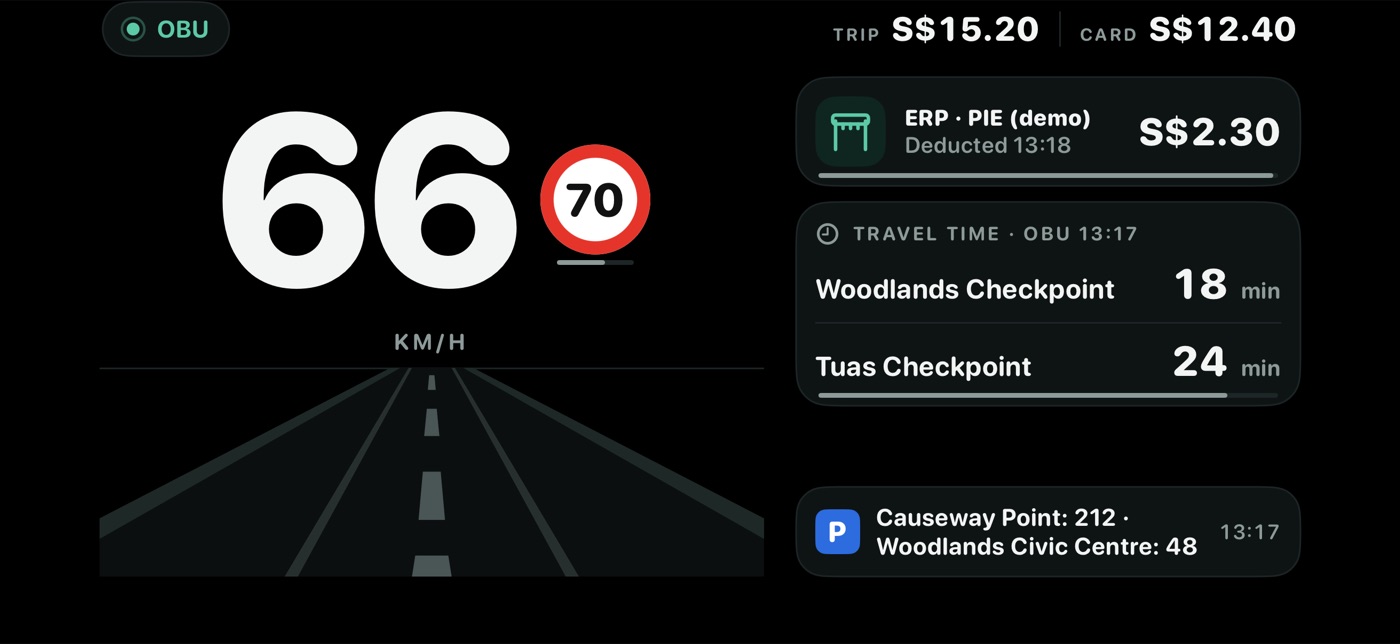
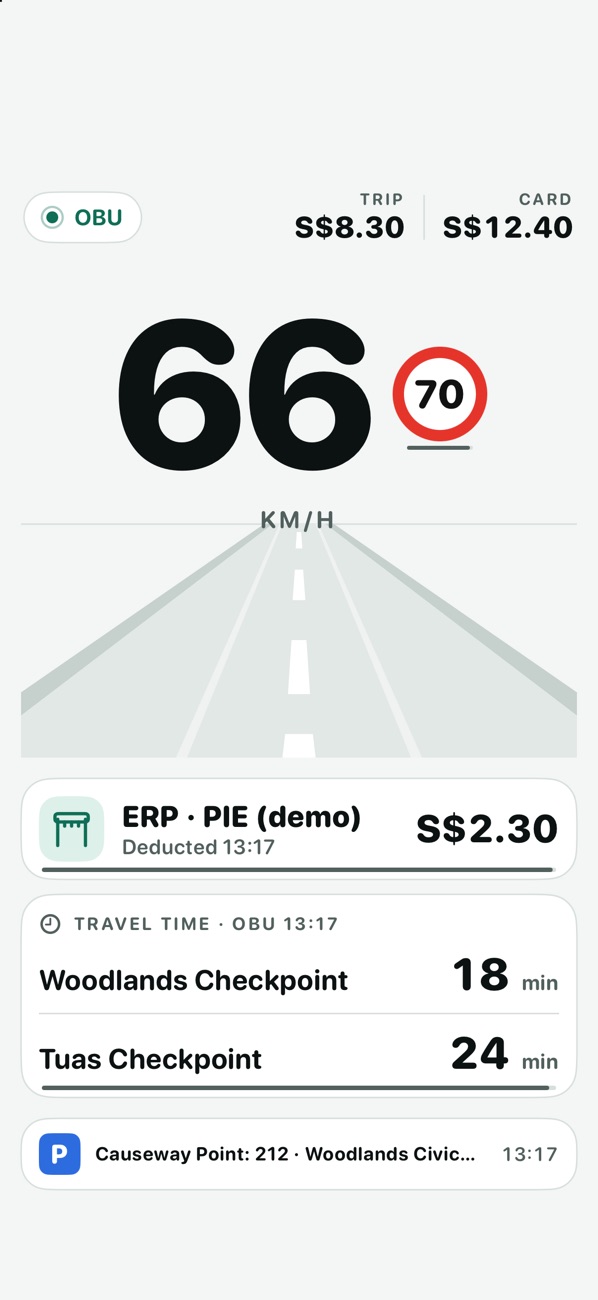
- **Top bar:** on the left, the OBU's status ("Looking for the OBU" while Kerbside keeps trying) or your speed with the speed-limit sign; on the right, **TRIP** (this trip's total) and **CARD** (your card balance, amber when low). A red **EYES** dot shows while eye numbers are being recorded (see [Cabin](#cabin)).
- **Bottom line:** the latest OBU announcement that the page isn't already showing, with its time. Bare speed-limit messages are skipped, because the sign shows them.
**Speed comes from the OBU** while it's sending one. Otherwise the heads-up shows your iPhone's GPS speed, marked **KM/H · GPS**. With neither (or a GPS fix more than 3 seconds old) you'll see "–".
## Alerts that take over
When something important happens, it replaces the middle of the page (the whole width in landscape), with an amber bar counting down. Most important first:
| Alert | Shown for | When |
|---|---|---|
| **CHECK THIS** | Up to 10 min | A charge wasn't deducted, a card problem, or a parking notice |
| **CHARGE AHEAD** | Up to 2 min | The OBU announces the next charge. Shows the amount and place; "Charged as you pass the gantry". Ends when the deduction arrives |
| **CAMERA ZONE**, **RED-LIGHT CAMERA**, **BUS LANE** | 20 s | An LTA message about a camera or bus lane, with the speed limit if given and "You're at N km/h" |
| **TRAFFIC AHEAD** | Up to 2 min | A high-priority traffic message |
Alerts don't take over the Parking page. Kerbside's road-ahead alerts (signs, faulty lights, flood alerts, your carpark's lots) arrive as notifications and on the Drive tab, not on the heads-up.
## The seven pages
Swipe left or right to move between them.
### Drive
Your speed in large type, the speed-limit sign, and school, silver or camera zone chips from LTA's messages. Beside or below it:
- the last deduction (15 minutes);
- a parking session;
- the border band, e.g. "Woodlands → JB ~30 min", when you're within 1.5 km of a checkpoint. It comes from the [Kerbside server](https://irrhuh.app/kerbside/guide/kerbside-server.html), is fetched while the OBU is sending its speed, and is the band for the checkpoint and direction you're at: towards JB on the Singapore side, towards Singapore on the Malaysian side, whatever Settings › Route says. It's hidden once it's more than 30 minutes old;
- the OBU's travel times (up to 4 rows, 10 minutes);
- **Busy streets**: the busiest few streets right now, by the share under 20 km/h in LTA's latest hourly reading, with a red and amber bar. Up to 3 streets, fewer when the OBU's cards need the room. It needs the Kerbside server, hides itself when LTA's reading is over 2.5 hours old, and can be turned off in Settings › Busy streets.
### Cluster
A speedometer from 0 to 140 km/h with a red notch at the limit, and two tiles:
- **G-FORCE:** how hard the car is braking, accelerating or turning, in g, with words like "Braking" or "Turning left". The dot turns amber above 0.3 g.
- **ROAD & DRIVE:** a one-minute graph of road roughness, with humps in blue and sharp hits in amber; a word ("Smooth", "A bit rough", "Rough"); your driving style (**COMFORT**, **SPORT** or **TRACK**); and the last bump.
### Sensors
A compass with your heading, two car drawings showing how the car is tilted (left/right and front/back, amber at 8° or more) and your altitude. These need Kerbside to learn how the phone sits in the mount: "Self-levelling N%" fills as you drive straight and steadily, typically in about 3 minutes. Kerbside remembers up to 4 mounts and recognises one when you put the phone back.
### Cabin
The Cabin page uses the iPhone's front (TrueDepth) camera and Apple's face tracking to show how open your eyes are, where you're looking and how your head is turned. It draws an outline from the face tracking, never a picture, and keeps numbers only, on your iPhone.
| Part | What it shows |
|---|---|
| **Front camera · outline** | Dots and an outline of your face as the camera sees it, drawn as in a mirror. Your eyes (amber when nearly closed), a solid line for where your head points and a dashed line for where your eyes look. Below: "Face seen N% · light N" |
| **Eyes · how open** | A bar and percentage for each eye (amber under 25%). "Looking N° down · N° right", with "eyes lowered N%" when your eyes are turned down. "Last closed 0.2 s at HH:mm · longest 0.3 s · N blinks in the last minute"; blinks show only when your face was seen for most of that minute |
| **Head · from the phone** | How far your face is from the phone in cm, "Turned N° left · chin N° down · tilted N° right", and "Mouth open (yawn?)" |
| Record button (top right) | **Tap to record drives**, **Records on drives** or **REC since HH:mm**. See below |
**Recording eye numbers.** Off at first. Tap the record button to turn **Records on drives** on. Kerbside then records the eye and head numbers during every [recorded drive](https://irrhuh.app/kerbside/guide/recorded-drives.html) while heads-up mode is open, on any page, starting and stopping with the drive. A red **EYES** dot in the top bar shows while it records. It never records pictures or video, and nothing is sent anywhere. What's kept is listed in [Data on your iPhone](https://irrhuh.app/kerbside/kb/data-on-your-iphone.html).
**When the camera runs:** while the Cabin page is on screen, and during a recorded drive with **Records on drives** on. It stops when heads-up mode closes, in mirror mode ("Off in mirror mode"), and while the iPhone is hot ("Paused: the iPhone is hot"). iOS stops the camera whenever Kerbside isn't on screen.
**It needs** Camera access (iOS asks the first time the camera starts) and an iPhone that supports face tracking ("This iPhone can't track faces" otherwise). In a dark car it may say "Can't see your face · it's dark".
**It doesn't** warn you when your eyes close, judge whether you're tired, or identify you. It isn't a safety device. A glance down at a map lowers your eyelids as the camera sees them, so a short "closed" reading may be a glance; the "Looking … down" line helps tell them apart.
### Parking
- **When you're parked** in a roadside OBU car park: the car park's name, the fee so far from the OBU, how long you've been parked and the 2-hour forecast.
- **When you're not parked:** the car parks the OBU has announced, with free lots, and up to 3 HDB carparks within 500 m with live lots (amber at 5 or fewer). They're car lots, or motorcycle lots if you chose **Motorcycle** in Explore › **Plan parking**.
The HDB list follows you: it's worked out from your GPS position every second, using island-wide lots that Kerbside downloads from data.gov.sg when the page opens near an HDB carpark (at most every 2 minutes, every 10 minutes while you stay put). It doesn't need the Kerbside server. The heading shows the time of those lots. Until the first download comes back the list says "Checking HDB lots…"; "None within 500 m" means there really are none.
The heads-up switches to this page by itself when a parking session starts, or when a car park message arrives below 25 km/h. It goes back to your previous page once you've driven above 30 km/h for 10 seconds.
### Sky
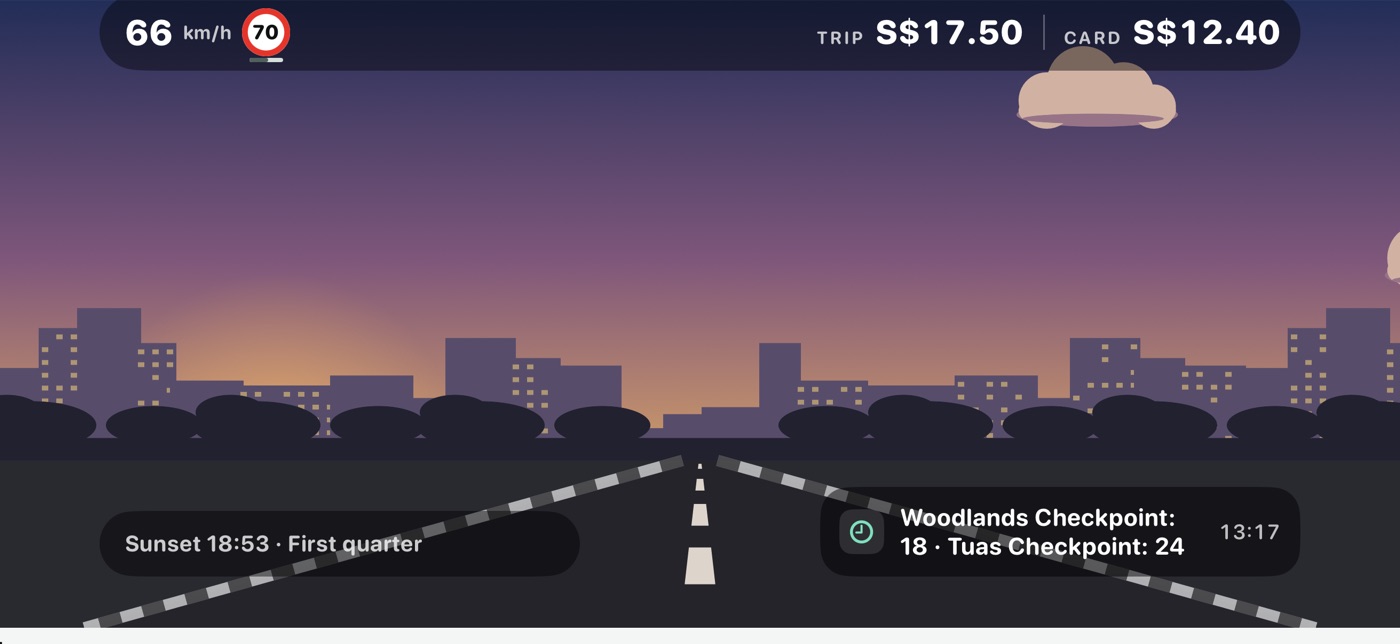
An illustrated Singapore street with the real sky: the sun and moon where they are compared with your heading, the weather and the time of day. Cards show glare when the sun is low ahead, rain ahead of you or where you are, the 2-hour forecast, and sunrise or sunset with the moon's phase. The weather comes from data.gov.sg, not the Kerbside server. Without location it uses central Singapore.
### Photos
A slideshow of up to 30 of your own photos, a new one every 12 seconds, with the top bar and alerts on top. Tap **Choose photos** to pick them; **Change** replaces the whole set. Kerbside copies the photos you pick into the app; it can't see the rest of your library.
## What heads-up mode keeps
During a recorded drive with heads-up mode open, Kerbside saves the motion sensor readings on your iPhone; they start and stop with the drive (about 13 MB an hour, up to 500 MB in total). Bumps it feels are added to the recorded drive. With **Records on drives** on, the Cabin page's eye and head numbers are saved the same way (about 9 MB an hour, up to 300 MB). See [Data on your iPhone](https://irrhuh.app/kerbside/kb/data-on-your-iphone.html).
---
id: drive-card
type: screen
title: The drive card (Lock Screen, Dynamic Island, CarPlay)
summary: The drive card is a Live Activity showing this trip's total, your card balance, the next and last charge, LTA's messages and road-ahead alerts on the Lock Screen and Dynamic Island, and on iOS 26 on the CarPlay Dashboard. It starts when the OBU connects while Kerbside is open, or from the Drive tab or a Shortcut.
section: using
url: "https://irrhuh.app/kerbside/guide/drive-card.html"
related: [drive-tab, carplay, alerts, your-first-drive, troubleshooting]
platform: [iphone, carplay]
applies_to: 1.0
updated: 2026-11-18
opens_from: [drive-tab]
---
# The drive card (Lock Screen, Dynamic Island, CarPlay)
The drive card is Kerbside's Live Activity. It keeps this trip's charges in view while you use another app, without opening Kerbside.
## Where it shows
| Place | What it shows |
|---|---|
| **Lock Screen** | "Kerbside · OBU", your card balance, this trip's total, the last charge, the next charge, the latest traffic message, the latest road-ahead alert (2 minutes), a parking session, any warning, and the border band near a checkpoint |
| **Dynamic Island** | Compact: the trip total (a warning triangle when something needs attention). Long-press for the card balance and the most important line: a warning, a traffic message, a road-ahead alert, the next charge or the border band |
| **CarPlay Dashboard** (iOS 26) | The trip total and card balance, then the most important of: a warning, the next charge, parking, traffic, the border band |
Kerbside has no Home Screen widgets. On the CarPlay Dashboard the drive card works in every build; Kerbside's own CarPlay app needs Apple's CarPlay permission in the build. See [Kerbside in CarPlay](https://irrhuh.app/kerbside/guide/carplay.html).
**The border band** shows when your last recorded position is within 1.5 km of Woodlands or Tuas checkpoint. It comes from the [Kerbside server](https://irrhuh.app/kerbside/guide/kerbside-server.html), fetched while the OBU is sending its speed, and is the band for the checkpoint and direction you're at: towards JB on the Singapore side, towards Singapore on the Malaysian side, whatever Settings › Route says. Without the server it doesn't show. **Road-ahead alerts** also need the server; see [Alerts](https://irrhuh.app/kerbside/guide/alerts.html#road-ahead-alerts).
## Start it
- **By itself:** when the OBU connects while Kerbside is on screen. iOS doesn't let apps start a Live Activity from the background, so if the OBU connects while Kerbside is closed, the card starts the next time you open Kerbside.
- **By hand:** Drive tab › **Drive card** (Calm mode).
- **With Shortcuts or Siri:** "Start Kerbside drive card". You can make this an automation in the Shortcuts app, for example when CarPlay connects.
It needs Settings › Alerts and drive card › **Drive card (Live Activity)** on (the default), and Live Activities allowed for Kerbside in iOS Settings.
## End it
- **By itself:** when the OBU sends its trip summary as you switch off. The ended card stays on the Lock Screen for 15 minutes.
- **By hand:** Drive tab › **End card**, or the Shortcut "End Kerbside drive card".
If the OBU stops sending without a trip summary, the card stays until you end it. It's marked out of date after 30 minutes without an update.
## Updates
The card updates on every charge, message and change, at most every 5 seconds. When a new warning appears, the card alerts with a sound.
**Note:** On the CarPlay card, the card balance turns amber below S$10.00, whatever your low-balance setting.
---
id: carplay
type: screen
title: Kerbside in CarPlay
summary: Kerbside appears in CarPlay as the drive card on the CarPlay Dashboard (iOS 26), and as its own CarPlay app with three information screens (Now, Border, Trip) in builds that carry Apple's CarPlay permission for driving-task apps. It never navigates and has nothing to set on the car screen.
section: using
url: "https://irrhuh.app/kerbside/guide/carplay.html"
related: [drive-card, alerts, kerbside-server, faq]
platform: [iphone, carplay]
applies_to: 1.0
updated: 2026-11-18
---
# Kerbside in CarPlay
Kerbside shows on a CarPlay screen in two ways: the **drive card** on the CarPlay Dashboard, next to Google Maps or Waze, and Kerbside's own **CarPlay app** with three screens of information. Neither navigates, and neither has buttons to press while you drive.
## The drive card on the Dashboard
On iOS 26, the [drive card](https://irrhuh.app/kerbside/guide/drive-card.html) appears on the CarPlay Dashboard: this trip's total and your card balance, then the most important of a warning, the next charge, a parking session, LTA's latest traffic message or the border band. It needs no special permission.
## The CarPlay app
**Only in builds with Apple's permission.** Apple lets an app show its own screens in CarPlay only when its build carries Apple's CarPlay permission for driving-task apps. If Kerbside's icon isn't on your car's CarPlay Home screen, or in your car's list of apps in iOS Settings › General › CarPlay, the Kerbside on your iPhone doesn't have it. The drive card on the Dashboard works either way.
The app has three tabs:
| Tab | What it shows |
|---|---|
| **Now** | **Attention** first, when something needs checking. Then **OBU** (Connected or Not connected), **This trip**, **Next charge** (for 2 minutes after the OBU announces it), **Last charge** with its time and place, **Card balance**, **Traffic** (LTA's latest traffic message, for 10 minutes) and **Ahead** (the latest [road-ahead alert](https://irrhuh.app/kerbside/guide/alerts.html#road-ahead-alerts), for 2 minutes) |
| **Border** | The border band for **Woodlands → JB**, **Woodlands → SG**, **Tuas → JB** and **Tuas → SG**, each with the camera time, or "No recent camera frames". "Singapore side only. Excludes immigration and the Malaysian side." Needs the [Kerbside server](https://irrhuh.app/kerbside/guide/kerbside-server.html); without it, "Kerbside server not reachable" |
| **Trip** | This trip's charges by type (ERP, CPT, EPS and so on), or "No charges yet this trip" |
The screens refresh every 10 seconds, the most often Apple allows for this kind of app. Everything on the **Now** and **Trip** tabs, apart from **Ahead**, comes from the OBU through your iPhone.
## Notifications on the car screen
Kerbside marks its notifications as allowed in CarPlay. iOS shows them on the car screen only for an app with the same CarPlay permission; otherwise they arrive on the iPhone only.
## What it doesn't do
- No navigation, maps or directions in CarPlay. Use Google Maps, Waze or Apple Maps.
- No heads-up mode, Ledger, Explore or settings on the car screen.
- Nothing to tap or type while driving.
---
id: border
type: screen
title: The Border tab
summary: The Border tab suggests when to leave for Woodlands or Tuas checkpoint and shows how busy the Singapore side is now, as a band (<15 min, ~30 min, ~1 h, >1 h) from LTA's checkpoint cameras. Everything on it comes from the Kerbside server; it works without an OBU but not without the server.
section: using
url: "https://irrhuh.app/kerbside/guide/border.html"
related: [how-the-border-queue-is-counted, kerbside-server, crossing-timer, alerts, explore]
platform: [iphone]
applies_to: 1.0
updated: 2026-11-18
leads_to: [explore, how-the-border-queue-is-counted]
---
# The Border tab
Kerbside's Border tab answers two questions for Woodlands or Tuas checkpoint: when to leave, and how busy the **Singapore side** is right now. It's the second tab in Calm mode. [Advanced mode](https://irrhuh.app/kerbside/guide/modes.html) shows the same figures on its Board and Forecast tabs.
**Needs the Kerbside server.** Every figure on this tab comes from the [Kerbside server](https://irrhuh.app/kerbside/guide/kerbside-server.html), set in Settings › Kerbside server. Without it, the tab shows "Can't reach your Kerbside server" and "No crossing data yet". It doesn't need an OBU, and nothing on it is counted on your iPhone.
**Note:** Settings › Leave time and Settings › Developer › Saved places call this tab "Today" in their explanations.
## Choose your route
At the top: **Woodlands | Tuas** and **to JB | to SG**. The same choice is in Settings › Route and on Advanced mode's tabs. Kerbside also uses it for the border band on the heads-up and the drive card.
## When to leave
The first card plans around the time you want to leave.
| Item | What it shows |
|---|---|
| Route | e.g. "Woodlands · Singapore → Johor" |
| **Leaving around** | When you plan to leave: 30 minutes from now ("in 30 min"), unless you pick a time with the clock. **Reset** goes back to 30 minutes from now, and so does a picked time once it has passed. With Settings › Leave time › **I cross at regular times** on, this line says "Your usual window HH:MM-HH:MM (change in Settings)" instead |
| **Leave at HH:MM** | The half-hour in your leave window with the lowest usual driving time. "tonight" is added when it's an evening time suggested before 17:00 |
| "about N min of driving…" | The usual minutes at that time: "to reach Woodlands Checkpoint" towards Johor, or "from Woodlands Checkpoint into Singapore" towards Singapore |
| Driving now | The server's latest estimate, e.g. "Driving now: 18 min" |
| No suggestion | "About N min of driving now" and the reason, e.g. "A leave-time suggestion appears after Kerbside has logged at least one full day", "Your usual window (17:00-23:30) is over for today" or "Suggestions cover today until 23:30" |
**Your leave window** is the half-hour of your planned time and the four half-hours after it (2 hours in all), today only, up to 23:30. With **I cross at regular times** on, it's the window you set in Settings › Leave time (17:00 to 23:30 at first).
**The minutes** are the drive on the Singapore expressway and the Causeway or Second Link, from LTA's travel times. They don't include immigration, customs or the Malaysian side. "Usual" is the middle value of the days the server has logged at that half-hour: the same weekday when there's enough history, otherwise recent evenings.
### The chart
"Around HH:MM" (or "Your usual window") draws the usual minutes as a line and the typical range (the middle half of logged days) shaded, from an hour before your window to an hour after. A dashed line marks now and a dot marks the suggested time. The caption gives the number of days of history. With no history for those times it says "No evening pattern yet".
## Singapore side now
| Band | Meaning |
|---|---|
| **<15 min** (green) | The camera view is under a quarter full |
| **~30 min** (orange) | Under 70% full |
| **~1 h** (red) | Fuller than that |
| **>1 h** (red) | The server has seen it full for 45 minutes or more |
The band covers the Singapore side only: the road into and through the Singapore checkpoint. It doesn't include immigration and customs inside the building, or the Malaysian side. For how it's worked out, including when the cut points differ for a camera, see [How the border queue is counted](https://irrhuh.app/kerbside/kb/how-the-border-queue-is-counted.html).
| Item | What it shows |
|---|---|
| Band line | "Traffic cameras at HH:mm", with "queue filling the view since HH:mm" at ~1 h or >1 h, and "Excludes immigration and the Malaysian side." |
| Camera pictures | The frames behind the band: your direction's lanes outlined and each vehicle the server counted shaded, with "N of ~M when full" and the time. Tap one to see it larger |
| Lorry note | In daylight, when lorries and buses fill most of the view: the band is for cars and motorcycles, and a line gives the band for lorries and buses |
| **Tell me when it's ~30 min or less** | Shown at ~1 h or >1 h. The Kerbside server sends you one notification through Apple Push when the band drops to ~30 min or less in the next 6 hours. See [Alerts](https://irrhuh.app/kerbside/guide/alerts.html#alerts-when-the-app-isnt-running) |
| **Bridge to Malaysia** (to JB only) | The queue on the Causeway or Second Link into the Malaysian checkpoint: **Clear**, **Busy** or **Queued**, with its camera picture |
| **Malaysia side** (to SG only) | "No public data": there are no public Malaysian checkpoint cameras or queue times |
| **Google Maps drive, both sides** | Google's traffic-aware drive time, with the time it was checked. "May not include the wait at immigration." Shown only when the Kerbside server is set up to fetch it |
## Chips
| Chip | Meaning |
|---|---|
| "Typical Tuesday · N day(s)" or "Recent evenings · N day(s)" | What the usual minutes are based on |
| "Next 2 h: …", or the rain in the last hour | NEA's forecast or rain gauge at the checkpoint |
| "N incidents on the way to Woodlands" or "No incidents near Woodlands" | LTA's traffic incidents near the checkpoint |
| "Jam score N/100" | How jammed the roads to the checkpoint are, from LTA's speed readings |
## Buttons
- **Remind me 10 min before:** a notification on your iPhone 10 minutes before the suggested time, e.g. "Leave for Woodlands at 22:30". The button then says "Reminder set for HH:MM". A new reminder replaces the old one.
- **Apple Maps**, **Google Maps**, **Waze:** open that app with directions to the checkpoint. The app chosen in Settings › Route › **Drive with** is highlighted. Google Maps and Waze open in Safari if the app isn't installed. Kerbside doesn't navigate.
## Your places
Shown when you've saved places or carparks ([Explore](https://irrhuh.app/kerbside/guide/explore.html#saved-places)): each saved carpark's lots now, with LTA's time and the usual lots at this time, and a **Park near …** button for each saved place, which opens the parking planner.
## Busy streets
How slow a list of named streets is right now, from LTA's Traffic Speed Bands, which the Kerbside server logs once an hour. The streets are chosen on the server, grouped by area.
| Part | Meaning |
|---|---|
| Bar | The street's length, both directions together: red under 20 km/h, amber 20–29 km/h, the rest 30 km/h or more |
| % | The share of the street's length under 20 km/h |
| "typically N–M km/h" | The speed band at half the street's length |
| "slowest 350 m under 20 km/h…" | The longest connected slow stretch in one direction, with the junctions at its ends |
| "as of HH:mm" | LTA's time for the reading; "old" in orange when it's over 2.5 hours old |
Some streets read slow even at night (junctions, small roads), so compare a street with itself at other times rather than with other streets.
## When it updates
Every 2 minutes while Kerbside is open, when it comes back to the front, when you change the route, and when you **pull down**. The bottom line says "Updated HH:mm", with "(stale)" when the server's latest estimate is old. LTA's checkpoint cameras change about every 5 minutes.
## What it doesn't do
- It doesn't count vehicles on your iPhone or download camera pictures from data.gov.sg; the Kerbside server does that.
- It doesn't time your own crossings. That's the [crossing timer](https://irrhuh.app/kerbside/guide/crossing-timer.html), in Settings › Crossing timer.
- It doesn't predict how the queue will change. The suggestion uses only the history the server has logged.
---
id: crossing-timer
type: task
title: Time your border crossings
summary: Turn on Settings › Crossing timer › Time my crossings and set Location to Always. Kerbside then measures each crossing from entering the checkpoint area on one side to leaving it on the other, to within a few minutes, and keeps the times on your iPhone. Sharing them with the Kerbside server is a separate, optional switch.
section: using
url: "https://irrhuh.app/kerbside/guide/crossing-timer.html"
related: [border, permissions, ledger, how-the-border-queue-is-counted, kerbside-server]
platform: [iphone]
applies_to: 1.0
updated: 2026-11-18
---
# Time your border crossings
Kerbside's crossing timer measures your real crossing time through both checkpoints, including the Malaysian side that the [border band](https://irrhuh.app/kerbside/guide/border.html) can't see. It works without an OBU.
## Turn it on
1. Open **Settings** and find **Crossing timer**.
2. Turn on **Time my crossings**.
3. When iOS asks, allow location, then choose **Change to Always Allow**. The timer needs Always so iOS can wake Kerbside at the border. Without it, Settings says "Needs location set to Always so iOS can wake the app at the border."
4. Optional: turn on **Share timings with the Kerbside server** (off at first). See [Sharing](#sharing-your-timings).
## How it measures
Kerbside watches four areas: one on each side of Woodlands and of Tuas. The areas built into the app are circles reaching about 1.5 km from the Singapore checkpoints and 1.2 km from the Johor side of the Causeway and Second Link; when the [Kerbside server](https://irrhuh.app/kerbside/guide/kerbside-server.html) has its own copy of the areas, Kerbside uses that instead. A crossing runs from the last time you entered the area on the side you left, to when you left the area on the other side. It must finish within 5 hours.
iOS reports these area crossings a few minutes late, so timings are good to a few minutes.
If your OBU's checkpoint toll falls within a timed crossing, Kerbside keeps its time ("toll at HH:mm") and uses the timing to fill in which way you crossed.
## Where the times show
- **Drive tab:** under **OBU trip summaries**, up to 10 timed crossings, e.g. "Woodlands → JB" with "42 min crossing".
- **Ledger:** **Timed crossings**, up to 8 for the month.
The Border tab doesn't show your own timings.
## Sharing your timings
With **Share timings with the Kerbside server** on, each new timing is sent to the Kerbside server: a random id made by Kerbside on this iPhone, the checkpoint, the direction, and the start and end times. No positions or route. The server pairs each timing with its camera and road readings at the start time, to learn how long a queue of a given size really takes. If the iPhone has no connection at the border, Kerbside tries again when it next comes back to the front. Timings made while sharing was off are sent then too, once you turn sharing on.
## What's kept
On your iPhone: only the start and end times, the checkpoint and the direction. Turning the timer off stops it watching and clears crossings in progress. Timings already made stay, on the iPhone and, if you shared them, on the server.
The timer also tells the [border band alert](https://irrhuh.app/kerbside/guide/alerts.html#other-alerts) to stay quiet on your way back from Johor.
---
id: explore
type: screen
title: Explore and parking plans
summary: Kerbside's Explore tab is a map of what the Kerbside server logs from Singapore's open data (carpark lots, EV chargers, incidents, overhead signs, faulty lights, road works, weather, rain and the checkpoint bands), with a "Usually at…" view and a parking planner that finds carparks near where you're going. Calm mode only; needs the Kerbside server.
section: using
url: "https://irrhuh.app/kerbside/guide/explore.html"
related: [kerbside-server, alerts, border, data-sources]
platform: [iphone]
applies_to: 1.0
updated: 2026-11-18
leads_to: [alerts]
---
# Explore and parking plans
Kerbside's **Explore** tab is a map of Singapore's open data as the [Kerbside server](https://irrhuh.app/kerbside/guide/kerbside-server.html) logs it, and the place to plan where to park. It's the fourth tab in Calm mode; Advanced mode doesn't have it.
**Needs the Kerbside server** for every layer and for parking plans. Without it, the map shows only your own position and the error under it.
The first time Explore opens, iOS asks for location. With location allowed, the map starts on you; without it, it shows Singapore. Kerbside doesn't navigate: to drive somewhere, it hands the place to Apple Maps, Google Maps or Waze.
## Map layers
Tap the chips above the map to turn layers on or off. **Checkpoints**, **Incidents**, **Carparks** and **Signs** are on when Explore opens. Tap a marker for its details.
| Chip | On the map | Details when tapped | Source, as shown in the app |
|---|---|---|---|
| **Checkpoints** | Woodlands and Tuas | The band to JB and to SG with its time. "Singapore side only, from traffic cameras." | Kerbside camera bands |
| **Carparks** | Free lots for a car (or a motorcycle, if you chose it in **Plan parking**) | Lots, the agency, and **Save carpark** | LTA DataMall carpark availability |
| **EV** | Free charging points | "N of M points free", the top power in kW, the address | LTA DataMall EV charging points |
| **Incidents** | Traffic incidents | LTA's text and since when | LTA DataMall traffic incidents |
| **Signs** | Overhead electronic signs | The sign's text | LTA DataMall VMS (overhead signs) |
| **Faulty lights** | Faulty traffic lights | LTA's text | LTA DataMall faulty traffic lights |
| **Road works** | Roads with work permits starting in the next 7 days | The permit; LTA gives the road and dates only, not the exact spot or hours | LTA DataMall road works |
| **Weather** | NEA's 2-hour forecast by area, and PUB flood alerts | The forecast or alert text | data.gov.sg 2-hour forecast and PUB flood alerts |
| **Rain** | Rain gauges, filled when raining | mm in the last 5 minutes | data.gov.sg rainfall |
- Layers load when you're zoomed in to part of the island ("Zoom in to load the map layers"). **Carparks** and **EV** load only within a few kilometres ("Zoom in to a few km to see carparks and EV chargers").
- The line under the map gives each layer's count, source and time. "300+ (zoom in for all)" means there are more than shown.
- Explore shows no live traffic speeds and no accidents or speed cameras as alerts. Google Maps and Waze already do that.
## Usually at…
Switch **Now | Usually at…** at the top and pick a day and time. **Carparks** then show their usual lots at that time, and expressways are coloured by their usual speed: green fast, orange slower, red under 40 km/h. "Usually" is the middle value on past days of the same kind (weekdays, Saturdays, or Sundays and public holidays) at that time. Until the server has logged enough days, it says "Building history: N of M …".
## Road-ahead alerts while Explore is open
While Explore is on screen with location allowed, your position also drives Kerbside's [road-ahead alerts](https://irrhuh.app/kerbside/guide/alerts.html#road-ahead-alerts), with or without the OBU connected. The latest one shows as a banner at the top of the map for 90 seconds; tap it to hide it. Your position is checked on the iPhone; it isn't sent to the server.
## Plan parking
Use this before you set off, to find a carpark near where you're going and hand it to your navigation app as the destination.
1. In Explore, tap **Plan parking** (the P button, top right). You can also tap **Park near …** under Your places on the Border tab.
2. In **Where are you going?** type a place or address and pick it from the list (Apple Maps search), or tap a saved place.
3. Choose **Car** or **Motorcycle**, how far you'll walk (**200 m**, **400 m** or **800 m**; 400 m at first) and when you're **Arriving** (30 minutes from now at first).
4. The map and list show the carparks within that distance of the destination, with their distance, lots now (orange at 5 or fewer), "At arrival: usually N to M lots", and the rate.
5. Tap a carpark for its lots now, a chart of its usual lots through the day with your arrival marked, the walk to your destination (from Apple Maps) and its rate.
6. Tap **Drive there with …** (your usual app first). Kerbside opens that app with the carpark as the destination and remembers the carpark for 6 hours.
About 1 km before you reach that carpark, Kerbside tells you its lots, and suggests the nearest carpark with space if it has 5 or fewer. That's the road-ahead alert **Lots at your carpark as you arrive**; it needs Kerbside to be following your position (the OBU connected, heads-up mode open, or Explore on screen).
- **Rates:** URA's carpark rates. HDB and mall rates aren't in the open data, so those say "HDB rate not in the open data" or "Mall rate not in the open data".
- **Distances** are straight lines from the destination.
- **No live lots:** some carparks don't publish lots; they show their total lots, if known.
- **Save place** (top right) keeps a searched place for next time.
## Saved places
Settings › Developer › **Saved places** lists your places and carparks.
| Part | What it does |
|---|---|
| **Set Home**, **Set Work**, **Add a place** | Search for a place and save it. Tap a saved place to plan parking there |
| **Carparks (N of 5)** | Up to 5 carparks, saved with **Save carpark** on a carpark's page or in Explore |
| Swipe left | Deletes a place or carpark |
Saved carparks appear on the Border tab under **Your places** with their lots now, and Kerbside tells you their lots when you're within 1 km of one and below about 50 km/h. Places stay on your iPhone; only carpark ids are sent to the Kerbside server.
---
id: ledger
type: screen
title: The Ledger
summary: The Ledger collects every charge your OBU reports (ERP, checkpoint tolls, parking) by month, with weekly bars, an insight, your checkpoint crossings and costs you add yourself. Export a month as CSV with the share button.
section: using
url: "https://irrhuh.app/kerbside/guide/ledger.html"
related: [drive-tab, crossing-timer, data-on-your-iphone, faq]
platform: [iphone]
applies_to: 1.0
updated: 2026-11-18
---
# The Ledger
The Ledger tab is your monthly record of driving costs. Charges from the OBU go in by themselves; you can add fuel, charging and other costs by hand. It's in both Calm and Advanced mode (dark in Advanced). It stays on your iPhone and doesn't need the Kerbside server.

## The month
At the top: **‹ Month Year ›** to move between months, the month's total, and the total per category: **ERP**, **Checkpoint toll**, **Parking**, **Fuel**, **Charging** and **Other**.
| OBU charge type | Ledger category |
|---|---|
| ERP | ERP |
| CPT (checkpoint toll) | Checkpoint toll |
| EPS, EEP, REP (parking) | Parking |
| OPC (off-peak car e-Day licence) | Other |
| Anything else | Other |
Amounts are exact to the cent. If a charge was missed while the app was disconnected, Kerbside fills it in from the OBU's own payment record, labelled "from the OBU's payment record".
## Weeks and Insight
- **Weeks:** a bar for each week of the month, coloured by category.
- **Insight:** one line once there are at least 3 entries this month. For example, the hour of the day when most of your ERP spend happened, parking's share of the month, or how this month compares with last month so far.
## Checkpoint crossings
Each OBU checkpoint toll (CPT) is recorded as a crossing. This section shows the number this month, typical and worst trip times (from the OBU's trip summaries), and the latest crossings with their direction:
- a location icon means it was worked out from your position;
- a hand icon means you told Kerbside, or the crossing timer did.
If Kerbside couldn't tell which way you crossed, the crossing shows **Which way?** with **to JB** and **to SG** buttons.
## Timed crossings
Your [crossing timer](https://irrhuh.app/kerbside/guide/crossing-timer.html) results for the month, up to 8. Turn the timer on in Settings › Crossing timer › **Time my crossings**.
## Entries
Every charge and cost this month, with "OBU" or "Added by you".
- **Add a cost:** tap **+** (top right), choose a **Category**, enter the **Amount (S$)**, **When** and an optional **Note**, then **Save**.
- **Delete:** swipe left on an entry you added. Charges from the OBU can't be deleted.
## Export
Tap the share button (top left, shown when the month has entries) to export the month as a CSV file, `kerbside-ledger-YYYY-MM.csv`, with the columns `date, category, amount_sgd, source, detail`.
---
id: recorded-drives
type: screen
title: Recorded drives
summary: "Kerbside records each drive while the OBU is connected, while you drive with the heads-up open, or after Record a drive now: the route, speed, and where each charge and OBU message happened. Open a drive for its map and summary, export it as GPX, or swipe left to delete it."
section: using
url: "https://irrhuh.app/kerbside/guide/recorded-drives.html"
related: [drive-tab, data-on-your-iphone, permissions, settings]
platform: [iphone]
applies_to: 1.0
updated: 2026-11-18
opens_from: [drive-tab]
---
# Recorded drives
Kerbside keeps a record of each drive on your iPhone: the route, your speed, and where each charge and OBU message happened. Find them on the Drive tab (Calm mode) under **Recorded drives** (the newest 40 are listed). Recorded drives never leave the iPhone unless you export one.
## When a drive is recorded
| Starts | Stops |
|---|---|
| The OBU connects, if Settings › **Record drives** is on (the default) | The OBU sends its trip summary as you switch off |
| The OBU hasn't connected, the heads-up is open, and GPS shows you moving faster than 15 km/h for 10 seconds (also needs **Record drives**) | 10 minutes below 8 km/h, or the heads-up closed for 10 minutes. If the OBU connects on the way, it carries on as the same drive |
| You tap **Record a drive now** (works without an OBU) | You tap **Stop** on a drive you started by hand |
- **Location:** a drive needs location set to While Using, or Always if the OBU connects while Kerbside is closed. Without location, nothing is recorded.
- **Pauses:** if the OBU disconnects, the drive pauses (unless the heads-up is open and you're moving: GPS carries it on). If it starts again within 10 minutes, it carries on the same drive.
- **Closed by Kerbside:** if a drive is left open, Kerbside closes it at its last point the next time it opens, with the note "Ended at its last point: the app was closed and not reopened within 10 minutes".
- **Very short drives** (fewer than 5 points and no charges or messages) aren't kept.
- **Heads-up recordings follow the drive:** with heads-up mode open, its motion readings, and the Cabin page's eye numbers if **Records on drives** is on, start and stop with the recorded drive. See [Heads-up mode](https://irrhuh.app/kerbside/guide/heads-up.html#cabin).
## The list
Each drive shows its date and time, distance and duration, the charges, "by hand" for drives you started yourself and "started by GPS" for drives the heads-up started without the OBU. **Swipe left to delete** a drive. There's no undo.
## A drive's details
Tap a drive to open it.
| Section | What it shows |
|---|---|
| Map | The route, with pins for charges ($), parking (P), OBU messages and bumps (ⓘ), and driving moments (!) |
| **Summary** | Distance, time (and time moving), average speed while moving, top speed, charges, and your driving style if heads-up mode was open |
| **From the OBU** | Each charge and message with its time. Bumps felt by the phone in heads-up mode are listed here too |
| **Driving moments** | Hard braking (−3.0 m/s² or harder), hard acceleration (2.5 m/s² or more) and sharp turns (4.0 m/s² sideways or more), worked out from GPS |
| **Export GPX** | Shares the drive as a GPX file ("Kerbside drive YYYY-MM-DD.gpx"): the track with times and heights, plus a waypoint for each charge and message |
## Coupon car parks
When a drive ends within about 50 m of a URA coupon car park or 90 m of an HDB one, and there was no roadside OBU parking session, Kerbside shows the car park's code on the Drive tab for 30 minutes, with a notification. Coupon car parks are paid with the Parking.sg app, not the OBU. **Check the code against the signboard** before paying. This needs the drive to have been recorded with location.
---
id: alerts
type: reference
title: Alerts and notifications
summary: Kerbside's notifications cover failed charges, card problems, high-priority traffic, low balance, parking, trip summaries and parking notices (from the OBU), the border band before a checkpoint, road-ahead alerts (overhead signs, faulty lights, flood alerts, your carpark's lots) and border watches. Most are made on your iPhone; watches come from the Kerbside server through Apple Push. Choose them in Settings › Alerts and drive card.
section: using
url: "https://irrhuh.app/kerbside/guide/alerts.html"
related: [drive-card, settings, kerbside-server, permissions, troubleshooting]
platform: [iphone, carplay]
applies_to: 1.0
updated: 2026-11-18
---
# Alerts and notifications
Kerbside's notifications show as banners while you're in Google Maps, Waze or any other app, and while Kerbside is open. Choose them in Settings › **Alerts and drive card**. All are on by default.
Where they come from:
- **Made on your iPhone from the OBU:** charges, card, traffic, parking, trip summaries, parking notices.
- **Made on your iPhone with data from the [Kerbside server](https://irrhuh.app/kerbside/guide/kerbside-server.html):** the border band before a checkpoint and the road-ahead alerts. Without the server, they don't arrive.
- **Sent by the Kerbside server through Apple Push:** watches ("Tell me when it's ~30 min or less"). These arrive even when Kerbside isn't running.
## Break through Focus (time-sensitive)
| Setting | Notification | When |
|---|---|---|
| **Charge not deducted** | "Charge not deducted": the type, amount and LTA's reason, "Check your card." | The OBU reports a failed deduction |
| **Card problem** | "Card problem: The OBU reports: . Charges may fail." | The card status isn't OK. Once per trip for each status |
| **High-priority OBU traffic messages** | "Traffic ahead" with LTA's message | A high-priority traffic message, not repeated within 2 minutes |
Kerbside sends these three as **time-sensitive**. iOS lets time-sensitive notifications through a Focus such as Driving only when the Kerbside on your iPhone carries Apple's time-sensitive permission; iOS Settings › Notifications › Kerbside then has a **Time Sensitive Notifications** switch. If it doesn't, add Kerbside to the Focus's allowed apps in iOS Settings › Focus.
## Other alerts
| Setting | Notification | When |
|---|---|---|
| **Low card balance** | "Card balance low: S$x.xx left, below your S$y.yy alert." | Once per trip, when the balance drops below your threshold |
| **Below S$10.00** (stepper) | | The low-balance threshold: S$5 to S$50 in S$5 steps. It also turns the balance orange in the app and heads-up |
| **Parking session started** | "Parking session started: ." | A roadside OBU parking session starts. Also controls the coupon car park alert |
| **Trip summary at ignition off** | "Trip summary: N min · X.X km · …" with the charges per type | The OBU sends its trip summary |
| **Border band about 3 km before a checkpoint** | "Woodlands → JB: ", "Singapore side, traffic cameras at HH:mm. Excludes immigration and the Malaysian side." | You enter a 500 m area about 3 km before Woodlands (on the BKE) or Tuas (on the AYE). See below |
**The border band alert** needs Location set to **Always**, so iOS can wake Kerbside there. Kerbside then asks the Kerbside server for the latest band; with no fresh band or no server, no alert is sent. It's sent at most once every 30 minutes for each checkpoint, and is meant for the way to Johor: if the [crossing timer](https://irrhuh.app/kerbside/guide/crossing-timer.html) is on and saw you leave the Johor side of that checkpoint in the last 45 minutes, it's skipped.
## Road-ahead alerts
Settings › Alerts and drive card › **On the road ahead**. These cover only what Google Maps and Waze don't alert on. Accidents, breakdowns, speed cameras and heavy traffic are left to them.
| Setting | Notification | When |
|---|---|---|
| **Overhead sign text ahead** | "Sign ahead" with the sign's text | An LTA overhead electronic sign within 2 km, roughly ahead of you (within 30° of your direction of travel), while you're moving |
| **Faulty traffic light ahead** | "Faulty traffic light ahead" with the place | A faulty traffic light within 1 km, roughly ahead, while you're moving |
| **PUB flood alert near you** | "PUB flood alert near you" with PUB's text | An active PUB flood alert within 3 km, in any direction |
| **Lots at your carpark as you arrive** | "Your carpark: " or "Saved carpark: ": "N lots now (LTA, HH:mm).", the usual lots at this time, and "Nearest with space: …" if it has 5 or fewer | Within 1 km of the carpark you picked with **Drive there with …** in the [parking planner](https://irrhuh.app/kerbside/guide/explore.html#plan-parking) (for 6 hours), or of a [saved carpark](https://irrhuh.app/kerbside/guide/explore.html#saved-places) while you're below about 50 km/h |
- **When they work:** while Kerbside is following your position: the OBU connected (the blue location indicator shows), heads-up mode open, or Explore on screen. They need Location (While Using is enough) and the Kerbside server.
- **Your position stays on the iPhone.** Every 5 minutes Kerbside downloads one island-wide list of signs, faulty lights and flood alerts from the Kerbside server and checks it on the iPhone. For your carpark's lots it asks the server about that carpark only.
- **Limits:** each item alerts once per drive; at most one alert every 3 minutes and 6 per drive. The limits start again with a new drive, or after half an hour in which Kerbside wasn't following your position.
- **Where they show:** as a normal (not time-sensitive) notification, on the [Drive tab](https://irrhuh.app/kerbside/guide/drive-tab.html) for 10 minutes, on the [drive card](https://irrhuh.app/kerbside/guide/drive-card.html) and the [CarPlay app](https://irrhuh.app/kerbside/guide/carplay.html) for 2 minutes, and as a banner on the Explore map for 90 seconds. Not on the heads-up.
## Alerts when the app isn't running
Settings › Alerts and drive card › **Alerts when the app isn't running**. A **watch** asks the Kerbside server to tell you once when the border band drops to **~30 min** or less within the next 6 hours. The server sends it through Apple Push, so it arrives even with the car off and Kerbside closed.
| Item | What it does |
|---|---|
| **This iPhone** | **Registered** once iOS has given Kerbside an Apple Push address, **Not registered** otherwise. An orange line gives the reason when iOS refused, or when Kerbside couldn't pass the address to the server |
| **Tell me when Woodlands → JB is ~30 min or less** | Sets a watch for Woodlands to Johor. The Border tab has a button for your own route when the band is ~1 h or more |
A watch needs three things: a Kerbside build with Apple Push turned on (**This iPhone** says **Registered**, with no orange line), the Kerbside server, and Apple Push set up on that server. Until the server is set up, watches are saved but nothing is sent. A new watch for the same route replaces the old one.
## Leave reminder
On the Border tab, **Remind me 10 min before** sets one notification on your iPhone, 10 minutes before the suggested leave time: "Leave for Woodlands at 22:30". It needs notifications allowed. A new reminder replaces the old one.
## Drive card
Settings › Alerts and drive card › **Drive card (Live Activity)** allows the [drive card](https://irrhuh.app/kerbside/guide/drive-card.html). On by default.
## Alerts that are always on
| Notification | When |
|---|---|
| "Parking offence notice" / "Parking advisory notice" | The OBU passes on a parking notice |
| "Parking fine due …" | 09:00 two days before a fine's due date. Tap **Paid or settled** on the Drive tab to cancel it |
| "A charge may be missing" | About 50 seconds after a trip summary, if the OBU's trip totals are higher than what Kerbside recorded. Add what's missing in the [Ledger](https://irrhuh.app/kerbside/guide/ledger.html) |
| "Which way did you cross?" | A checkpoint toll whose direction Kerbside couldn't work out. Touch and hold the notification to answer **To JB** or **To SG**, or use the **Which way?** buttons in the Ledger |
## In CarPlay
Kerbside's notifications can show on the car screen only if your build has Apple's CarPlay permission. See [Kerbside in CarPlay](https://irrhuh.app/kerbside/guide/carplay.html).
## Turning them off entirely
To stop all of Kerbside's notifications, use iOS Settings › Notifications › Kerbside.
---
id: settings
type: screen
title: Settings
summary: Kerbside's Settings tab holds the mode (Calm or Advanced), the Kerbside server address, your leave-time window, the crossing timer, busy streets, developer pages, your route and navigation app, the demo drive and drive recording, location, alerts and the drive card, the OBU, and data sources, privacy and help.
section: using
url: "https://irrhuh.app/kerbside/guide/settings.html"
related: [modes, kerbside-server, obu-page, alerts, permissions]
platform: [iphone]
applies_to: 1.0
updated: 2026-11-18
leads_to: [modes, kerbside-server, obu-page, alerts, data-sources, explore]
---
# Settings
Kerbside's **Settings** tab is the same in Calm and Advanced mode. From top to bottom:
| Section | Item | What it does | At first |
|---|---|---|---|
| **Mode** | **Calm \| Advanced** | Switches the app's layout. See [Calm and Advanced modes](https://irrhuh.app/kerbside/guide/modes.html) | Calm |
| **Kerbside server** | Address box, **Use this address** | The [Kerbside server](https://irrhuh.app/kerbside/guide/kerbside-server.html) that the Border tab, Explore, Advanced mode and road-ahead alerts use. The line below says **Connected · updated HH:mm** or gives the error | Empty: the default address built into the app |
| **Leave time** | **I cross at regular times** | Off: the Border tab plans around leaving 30 minutes from now, or the time you pick there. On: it always looks for the best time in the window below | Off |
| | **Usually leave from** … **to** | Your usual window, in half-hours (shown when the switch is on) | 17:00 to 23:30 |
| **Crossing timer** | **Time my crossings** | Times your real crossings. Needs Location set to Always. See [Time your border crossings](https://irrhuh.app/kerbside/guide/crossing-timer.html) | Off |
| | **Share timings with the Kerbside server** | Sends each timing (no positions) to the server (shown when the timer is on) | Off |
| **Busy streets** | **On the heads-up Drive page** | Shows the busy streets card on the heads-up Drive page | On |
| **Developer** | **Saved places** | Home, Work, other places and up to 5 carparks. See [Explore](https://irrhuh.app/kerbside/guide/explore.html#saved-places) | |
| | **Border band on this iPhone** | A test page, described below | |
| | **Mock OBU** | LTA's simulated OBU, described below | |
| **Route** | **Woodlands \| Tuas**, **to JB \| to SG** | The checkpoint and direction for the Border tab, Advanced mode, and the border band on the heads-up and drive card | Woodlands, to JB |
| | **Drive with** | Apple Maps, Google Maps, Waze or Ask each time. That app's button is highlighted on the Border tab and comes first on a carpark's page. Kerbside itself never navigates | Apple Maps |
| **On this iPhone** | **Try a demo drive (no OBU needed)** | Plays a labelled sample drive. See [Try the demo drive](https://irrhuh.app/kerbside/guide/demo-drive.html) | |
| | **Record drives** | Records each drive's route, speed and charges: while the OBU is connected, or while you drive with the heads-up open. When off, drives aren't recorded and the heads-up's motion and eye recordings don't start. **Record a drive now** still works | On |
| **Location** | **Location** | Shows the current permission: Always, While using, Off, Restricted or Not asked yet | |
| | **Allow while using Kerbside** / **Allow Always** / **Open iOS Settings** | Asks iOS for the next level, or opens iOS Settings if you've already answered | |
| **Alerts** | **Alerts and drive card** | Opens the [alerts settings](https://irrhuh.app/kerbside/guide/alerts.html), including road-ahead alerts and watches | |
| **OBU** | **OBU (ERP 2.0)** | Opens the [OBU page](https://irrhuh.app/kerbside/guide/obu-page.html): connect, your OBUs, setup and the event log | |
| **About** | **Data sources and licences** | Open-data attributions and the licences of what ships in the app. See also [Where Kerbside's information comes from](https://irrhuh.app/kerbside/kb/data-sources.html) | |
| | **Privacy policy**, **Help and contact** | Open these pages in Safari | |
| | **Version** | The version you're running, e.g. 1.0 (1). Include it when you write for help | |
Every section with an ⓘ has a short explanation; tap it.
**Note:** With **Record drives** off, Kerbside still follows your location while the OBU is connected if any [road-ahead alert](https://irrhuh.app/kerbside/guide/alerts.html#road-ahead-alerts) is on. Turn those off too in Settings › Alerts and drive card if you don't want that.
## Location levels
- **While using Kerbside:** drives are recorded; heads-up mode's compass, sky, weather and HDB carparks; your position on the Explore map and road-ahead alerts; and which way you crossed a checkpoint.
- **Always** adds: recording a drive that starts while Kerbside is closed, the crossing timer, and the border band alert about 3 km before a checkpoint.
Kerbside doesn't send your GPS position anywhere. The Explore map asks the Kerbside server about the area on screen; see [Permissions](https://irrhuh.app/kerbside/kb/permissions.html) and the [privacy policy](https://irrhuh.app/kerbside/privacy.html).
## Developer pages
- **Border band on this iPhone** opens "Border model check". It runs the two vehicle-detection models that ship in the app (YOLOv3 Int8 and YOLOv3 Tiny) on checkpoint pictures that ship with the app and were labelled by hand, and shows how many vehicles each found and how long it took. It doesn't download anything and doesn't change the band on the Border tab, which comes from the Kerbside server.
- **Mock OBU** uses LTA's Mock Manager, which simulates an ERP gantry, the Woodlands checkpoint toll and parking charges. Turn on **Use Mock OBU**, then **Search for the mock OBU** and connect. Everything it records is labelled "Mock OBU". While it's on, your real OBU won't connect. **Delete mock entries** removes the Ledger entries, crossings and trips it recorded; real and hand-added entries stay.
---
id: modes
type: screen
title: Calm and Advanced modes
summary: Kerbside has two modes, chosen in Settings › Mode. Calm (the default) has the Drive, Border, Ledger, Explore and Settings tabs. Advanced is a dark, number-dense view with Board, Forecast, Ledger and Settings, and no Drive tab, heads-up mode or Explore. Both use the same data from the Kerbside server.
section: using
url: "https://irrhuh.app/kerbside/guide/modes.html"
related: [settings, border, kerbside-server, explore]
platform: [iphone]
applies_to: 1.0
updated: 2026-11-18
opens_from: [settings]
---
# Calm and Advanced modes
Kerbside has two modes. Switch between them in Settings › **Mode** (**Calm | Advanced**). Both show the same figures from the [Kerbside server](https://irrhuh.app/kerbside/guide/kerbside-server.html), laid out differently, and both keep the OBU connected and recording in the background.
| | Calm | Advanced |
|---|---|---|
| Tabs | **Drive**, **Border**, **Ledger**, **Explore**, **Settings** | **Board**, **Forecast**, **Ledger**, **Settings** |
| How it looks | Light | Dark, monospaced figures |
| In the app's words | "The decision first: when to leave, and what you spent." | "Market-terminal view: live numbers, charts, signals." |
| Heads-up mode, the **Drive card** button, recorded drives, coupon car park codes, parking notices | On the [Drive tab](https://irrhuh.app/kerbside/guide/drive-tab.html) | Not available. Switch to Calm |
| Map and parking plans | On the [Explore](https://irrhuh.app/kerbside/guide/explore.html) tab | Not available |
| Leave-time suggestion and border band | On the [Border](https://irrhuh.app/kerbside/guide/border.html) tab | On Board and Forecast |
| Ledger | Light | The same Ledger, dark |
| Default | Yes | |
In Advanced mode the drive card still starts by itself when the OBU connects while Kerbside is on screen, and you can start or end it with the Shortcuts "Start Kerbside drive card" and "End Kerbside drive card".
## Board (Advanced)
| Panel | What it shows |
|---|---|
| Route | **Woodlands \| Tuas** and **to JB \| to SG**, shared with the rest of the app |
| Crossing now | The minutes of driving now, coloured by how jammed it is. **Δ typ**: minutes more or less than typical. **P**: where now sits among the logged values (percentile). **1h**: an hour ago. Below: **EST** (the expressway part), **CSWY** (the Causeway or Second Link part), **JAM** (jam score out of 100), **TYP** (typical minutes) and **N** (logged values behind the typical) |
| 24h · today vs typical | Today's estimates as a solid line, the typical day dashed, and the middle half of logged days as a band |
| Other checkpoint | The other checkpoint's minutes, jam score and difference from typical |
| Rain | Rain in the last 5 minutes and the last hour at the checkpoint, and NEA's 2-hour forecast |
| Camera queue | The checkpoint's latest camera picture and the vehicle count for your direction. "VIEW FULL" when the queue is longer than the camera can count |
| EV chargers | Free charging points out of the total, and the same for fast chargers |
| Signals · last 12h | Jams, incidents and other events near the checkpoints, with times |
## Forecast (Advanced)
| Panel | What it shows |
|---|---|
| Typical crossing · weekday × hour | A heatmap of typical minutes by weekday and hour. It fills in as days are logged |
| Best / worst | For the **Day** you pick: the best and worst half-hours in your leave window (Settings › Leave time) |
| Similar past days | Logged days whose pattern was closest to the day you picked |
| Our forecast error | How far the server's logged forecasts were from what was later measured, once enough have come due |
Typical values are the middle of logged data, not a model's prediction. Panels say so when there's too little history.
## What's not here
- Neither mode navigates. Both hand directions to Apple Maps, Google Maps or Waze.
---
id: obu-page
type: screen
title: The OBU page
summary: Settings › OBU (ERP 2.0) shows whether the OBU is connected, lets you connect or disconnect, lists OBUs found nearby, your saved OBUs and those paired with this iPhone, holds the one-time Setup, and has an event log for troubleshooting.
section: using
url: "https://irrhuh.app/kerbside/guide/obu-page.html"
related: [connect-your-obu, troubleshooting, settings, obu-and-erp]
platform: [iphone]
applies_to: 1.0
updated: 2026-11-16
opens_from: [settings]
---
# The OBU page
Open it from Settings › **OBU (ERP 2.0)**, or from the Drive tab › ⓘ › **OBU settings**. It's where you connect your OBU and check what's happening.
## Status
| Item | What it shows |
|---|---|
| Title | **Connected to** your OBU, **Searching…**, **Connecting…**, **Found** an OBU, **Not connected** or **Failed** |
| Line below | While connecting, the seconds so far ("pairing usually takes 10–20 s"). Otherwise the last message time, the card balance, and how the OBU pays: by card, by backend account, or no payment method turned on |
| **Connect** / **Disconnect** | Connect goes straight to the OBU found in the last 10 minutes, or opens **Connect an OBU** |
| Orange line | The latest error with its time, e.g. "Connection failed: Bluetooth off (1001)". It clears once a later step works |
Kerbside reconnects by itself when the app opens, when it comes back to the front, and after a disconnect. With a plate saved for the OBU it connects by plate; otherwise it looks for the OBU by name.
## Found nearby
OBUs found by the last search, kept for 10 minutes so you can connect without searching again. Shown only when you're not connected.
## My OBUs
Every OBU you've connected to. Tap one to:
- give it a **Name** (e.g. Family car) and a **Car plate**. With a plate, Kerbside reconnects without searching;
- see its **OBU number** and when it was last connected;
- **Forget this OBU**: removes it from Kerbside. It stays paired with the iPhone.
## Paired with this iPhone
The OBUs LTA's software has paired with this iPhone over Bluetooth. Kerbside connects to these straight away, without searching.
## Setup
- **Initialise SDK:** checks Kerbside's LTA developer key. It runs by itself when Kerbside opens, so it's normally ticked.
- **Grant OBU data permission:** LTA's screen asks once for permission for Kerbside to read OBU data. It's needed before any connection.
The ⓘ lists what to do before connecting a real OBU: disconnect other OBU apps, register your iPhone's Bluetooth address with LTA, and have internet.
## Event log
A list of what the OBU and Kerbside did, with times: launches, connections, charges, trip summaries and errors. The wording is technical. If you write in about a connection problem, a screenshot of the latest lines helps.
---
id: how-the-border-queue-is-counted
type: concept
title: How the border queue is counted
summary: The Kerbside server downloads LTA's checkpoint camera pictures from data.gov.sg and counts the vehicles in each direction's lanes with an object-detection model. The fuller the view compared with a full queue, the longer the band. Kerbside shows the server's band; it covers the Singapore side only, and the count is a minimum.
section: kb
url: "https://irrhuh.app/kerbside/kb/how-the-border-queue-is-counted.html"
related: [border, kerbside-server, crossing-timer, data-sources, faq]
platform: [iphone]
applies_to: 1.0
updated: 2026-11-18
---
# How the border queue is counted
Kerbside's border band is an estimate of the queue on the **Singapore side** of Woodlands and Tuas checkpoints. The [Kerbside server](https://irrhuh.app/kerbside/guide/kerbside-server.html) works it out from LTA's public traffic camera pictures, and Kerbside shows the result on the Border tab, in Advanced mode, on the heads-up, the drive card and the CarPlay app, and in the border alert. Your iPhone doesn't count anything, and there's no live data from the checkpoint authorities.
## Step by step
1. **Pictures.** The server downloads the latest pictures from LTA's checkpoint traffic cameras, published on data.gov.sg. LTA updates them about every 5 minutes. Pictures older than 30 minutes are ignored, and the band disappears until a newer one comes.
2. **Counting.** An object-detection model (YOLOv3) on the server finds cars, buses, lorries and motorcycles in each picture. A vehicle counts for a direction when it's inside that direction's lanes, which were drawn by hand for each camera.
3. **How full.** Each camera has a "full" count: roughly how many vehicles fill its view in a full queue. The count divided by "full" gives how full the view is. The server also measures how much of the lanes' road the vehicles cover, and uses whichever of the two is fuller. The busiest camera for your direction decides the band.
4. **The band.** Under a quarter full: **<15 min**. Under 70%: **~30 min**. Fuller: **~1 h**. **>1 h** once the server has seen it full for 45 minutes or more without a break.
For a camera where the server has enough hand-labelled examples of clear, busy and full pictures, it uses cut points learnt from those examples instead of a quarter and 70%.
## Cameras used
| Checkpoint and direction | Camera |
|---|---|
| Woodlands, towards Singapore | Woodlands Causeway |
| Woodlands, towards Johor | Woodlands Checkpoint (BKE side), and the BKE towards the checkpoint |
| Tuas, towards Singapore | Second Link at Tuas |
| Tuas, towards Johor | Tuas Checkpoint (the queue into Singapore customs) |
| Bridge to Malaysia (towards Johor) | Causeway towards Johor; Second Link towards Malaysia |
The Border tab shows the pictures that decided the band, with your direction's lanes outlined and each counted vehicle shaded.
## Lorries, buses and night
- **Lorries and buses (daytime):** lorries and buses have their own lanes. When they're most of the vehicles the deciding camera sees (at least 8, and 40% or more), and cars and motorcycles alone give a shorter band, the band is for cars and motorcycles, with a note on the lorry and bus lanes.
- **Night:** after dark the model sees less, so the server also counts headlights in the lanes. At night there's no split for lorries and buses.
## Limits
- **Singapore side only.** The band doesn't include immigration and customs inside the building, or anything on the Malaysian side. Towards Johor, **Bridge to Malaysia** shows the queue on the bridge as Clear, Busy or Queued, not minutes. Towards Singapore, the Malaysian side shows "No public data".
- **The count is a minimum.** A car hidden behind a lorry can't be seen.
- **It's a band, not a prediction.** It describes the queue in the latest pictures. The leave-time suggestion on the Border tab is separate: it's based on logged driving times, not on the band.
- **Up to 5 minutes behind,** plus the time until Kerbside next asks the server (every 2 minutes while it's open).
- **No server, no band.** Without the Kerbside server, Kerbside shows no band anywhere.
- For your own real door-to-door times, use the [crossing timer](https://irrhuh.app/kerbside/guide/crossing-timer.html).
## Privacy
The camera pictures are public. Nothing about you is used to work out the band: the server counts the same pictures for everyone, and Kerbside asks it only for the checkpoint and direction you picked.
---
id: obu-and-erp
type: concept
title: The OBU, ERP 2.0 and what Kerbside reads
summary: Your car's ERP 2.0 on-board unit (OBU) deducts ERP, checkpoint and parking charges and receives LTA's messages. Kerbside connects to it over Bluetooth through LTA's Extended OBU Library and shows what it reports. Kerbside can't change charges or pay anything.
section: kb
url: "https://irrhuh.app/kerbside/kb/obu-and-erp.html"
related: [connect-your-obu, obu-page, glossary, ledger]
platform: [iphone]
applies_to: 1.0
updated: 2026-11-16
---
# The OBU, ERP 2.0 and what Kerbside reads
**ERP 2.0** is Singapore's road-charging system. Every Singapore-registered vehicle has an **on-board unit (OBU)**. The OBU deducts ERP, checkpoint and parking charges, and receives traffic and parking messages from the Land Transport Authority (LTA).
Kerbside's OBU features are empowered by ERP 2.0, through LTA's **Extended OBU Library** (the OBU SDK): LTA's software that lets an approved iPhone app connect to an OBU over Bluetooth and read what it reports.
## What Kerbside reads from the OBU
| Information | Where Kerbside shows it |
|---|---|
| Charges deducted, failed and coming (ERP, checkpoint toll, parking) | Drive tab, drive card, heads-up, Ledger |
| Stored-value card balance and card status | Drive tab, drive card, heads-up, alerts |
| How the OBU pays: card, backend account, or no payment method | OBU page, Drive tab |
| LTA's traffic, travel-time and car park messages, in LTA's wording | Drive tab, heads-up, drive card |
| Parking sessions and the fee so far | Drive tab, heads-up Parking page |
| Parking offence and advisory notices | Drive tab, alerts |
| Trip summaries (time and distance at ignition off) | Drive tab, Ledger, alerts |
| Speed and speed-limit messages | Heads-up |
## What Kerbside can't do
- **It can't pay, top up, dispute or change a charge.** Charges are made by the OBU and LTA's system whether or not Kerbside is connected.
- **It can't show the OBU's own screen settings** or change them.
- **It isn't LTA's app.** Kerbside is independent. It isn't made by, or endorsed by, LTA or any Singapore government agency. For questions about a charge itself, contact LTA.
## Card or backend account
An OBU pays either from the **stored-value card** in it ("frontend") or from a **backend account** linked with LTA:
- **Card:** Kerbside shows the card balance and warns when it's low or the card has a problem.
- **Backend account:** Kerbside shows "Account / backend payment" instead of a balance.
- **The card failed over to the account:** Kerbside warns "Last charge paid by backend account, not the card".
## One app at a time
An OBU talks to one app at a time over Bluetooth. If LTA's ERP 2.0 app, Breeze or another OBU app is connected, Kerbside can't connect until it lets go.
## When Kerbside isn't connected
The OBU keeps charging as normal. Charges missed while Kerbside was disconnected are filled in from the OBU's own payment record (its last 5 payments of the trip) the next time Kerbside connects.
---
id: permissions
type: reference
title: Permissions Kerbside asks for
summary: Kerbside asks for Bluetooth (to reach the OBU), Location (While Using for drives, heads-up, Explore and road-ahead alerts; Always for background recording, the crossing timer and border alerts), Motion (heads-up sensors), Camera (the heads-up Cabin page, numbers only), Local Network (a Kerbside server on your Wi-Fi) and Notifications. LTA's software also asks once for OBU data permission.
section: kb
url: "https://irrhuh.app/kerbside/kb/permissions.html"
related: [settings, privacy, data-on-your-iphone, kerbside-server, troubleshooting]
platform: [iphone]
applies_to: 1.0
updated: 2026-11-18
---
# Permissions Kerbside asks for
Kerbside asks iOS for these permissions. The camera and the motion sensors are used on your iPhone only, and Kerbside never sends your GPS position anywhere. The map area you look at in Explore and the places you plan parking for do go to the [Kerbside server](https://irrhuh.app/kerbside/guide/kerbside-server.html); the [privacy policy](https://irrhuh.app/kerbside/privacy.html) lists everything that's sent.
| Permission | Used for | When it's asked |
|---|---|---|
| **Bluetooth** | Connecting to your car's OBU | When LTA's OBU software first uses Bluetooth |
| **Location: While Using** | Recording drives (route, speed, where each charge happened), heads-up mode's speed, compass, sky, weather and HDB carparks, your position on the Explore map, road-ahead alerts, and which way you crossed a checkpoint | The first time heads-up mode or Explore opens, a checkpoint toll arrives or you turn on the crossing timer, or when you tap Settings › Location › **Allow while using Kerbside** |
| **Location: Always** | Recording a drive that starts while Kerbside is closed, the crossing timer, and the border alert about 3 km before a checkpoint | Only when you tap Settings › Location › **Allow Always**, or turn on **Time my crossings**. Never during a drive |
| **Motion & Fitness** | The heads-up level, G-meter, road roughness and height (barometer) | The first time heads-up mode opens |
| **Camera** | The heads-up Cabin page: face tracking for your eyes and head. Numbers only, never pictures | The first time the Cabin page's camera starts |
| **Local Network** | Reaching a Kerbside server on the same Wi-Fi network as the iPhone | The first time Kerbside reaches a server on your local network. Not needed for a server on the internet |
| **Notifications** | Alerts made on your iPhone, the leave reminder, and watches sent by the Kerbside server through Apple Push. See [Alerts](https://irrhuh.app/kerbside/guide/alerts.html) | When Kerbside first opens |
| **OBU data permission** (LTA's screen) | Letting Kerbside read OBU data | When you tap Settings › OBU (ERP 2.0) › **Grant OBU data permission** |
| **Bluetooth address** (LTA's screen) | LTA checks the iPhone is registered for this OBU | The first time you connect to each OBU |
**Apple Push** needs no separate permission: iOS gives Kerbside a push address, which Kerbside passes to the Kerbside server for watches. Whether those notifications show depends on the Notifications permission.
## Not used
Kerbside doesn't ask for your microphone, contacts or photo library. The heads-up Photos page uses iOS's photo picker, which hands over only the photos you pick. Kerbside doesn't track you across apps.
## Changing them
- Location: Settings › Location in Kerbside, or iOS Settings › Kerbside › Location.
- Everything else: iOS Settings › Kerbside.
## What still works without them
| Turned off | What still works | What doesn't |
|---|---|---|
| Location | The OBU features, the Ledger, the Border tab, Advanced mode, Explore's map layers, heads-up mode | Recorded drives, road-ahead alerts, the crossing timer and the border alert. Heads-up speed comes from the OBU only, the sky uses central Singapore, and the HDB list says "Waiting for GPS". Kerbside asks which way you crossed a checkpoint instead of working it out |
| Camera | Everything except the Cabin page | The Cabin page says "Camera access is off" |
| Local Network | Everything, if your Kerbside server is on the internet | A Kerbside server on your Wi-Fi can't be reached |
| Notifications | Everything on screen | No banners, including watches and the leave reminder |
---
id: data-on-your-iphone
type: reference
title: Data on your iPhone
summary: "What Kerbside records stays on your iPhone and in your iPhone's own backups: charges, crossings, trip summaries, recorded drives, parking notices, logs, saved places, heads-up motion readings, Cabin eye numbers and photos. Drives export as GPX and the Ledger as CSV; deleting the app removes everything. Only the requests listed in the privacy policy go to the Kerbside server."
section: kb
url: "https://irrhuh.app/kerbside/kb/data-on-your-iphone.html"
related: [privacy, recorded-drives, ledger, permissions, kerbside-server]
platform: [iphone]
applies_to: 1.0
updated: 2026-11-18
---
# Data on your iPhone
Kerbside has no account and no cloud sync. What it records is kept on your iPhone, and in your iPhone's own iCloud or computer backups. The developer can't see it and can't recover it.
The [Kerbside server](https://irrhuh.app/kerbside/guide/kerbside-server.html) isn't a copy of this data. It receives only the requests listed in the [privacy policy](https://irrhuh.app/kerbside/privacy.html): for example the map area in Explore, a destination you plan parking for, your saved carparks' ids and, if you turn on sharing, your crossing timings.
## What's kept
| What | Details | Can you delete it? |
|---|---|---|
| Ledger entries | Each OBU charge and each cost you add: date, category, amount, detail | Entries you added: swipe left. OBU charges: only by deleting the app |
| Checkpoint crossings | One per checkpoint toll: time, checkpoint, amount, direction, and two location fixes used to work out the direction | Only by deleting the app |
| OBU trip summaries | Time and distance of each trip | Only by deleting the app |
| Timed crossings | Start and end times, checkpoint and direction, and whether each was sent to the server | Only by deleting the app. Shared copies stay on the server |
| Recorded drives | Route points (about one a second), speed, and where each charge, message and bump happened | Swipe left in Recorded drives |
| Parking notices | Each notice the OBU passed on | **Paid or settled** hides it; the record stays until you delete the app |
| Your OBUs | Each OBU's number, and the name and plate you give it | **Forget this OBU** |
| OBU event log | Connections, charges and LTA's messages, with times and the iPhone's position when each message arrived | Only by deleting the app |
| Saved places | Home, Work, other places and up to 5 carparks: names and positions | Swipe left in Settings › Developer › Saved places |
| Trip carpark | The carpark you picked with **Drive there with …**, for 6 hours | It expires by itself |
| Heads-up motion readings | The motion sensors (100 readings a second) and the OBU's own acceleration, recorded during a drive while heads-up mode is open: about 13 MB an hour, up to 500 MB | Only by deleting the app |
| Cabin eye and head numbers | Only with **Records on drives** on: for each camera frame (about 30 a second), whether a face was seen, how closed each eyelid is, how open the jaw is, the head's turn, nod, tilt and distance, the light level, and where the eyes look. No pictures. About 9 MB an hour, up to 300 MB | Only by deleting the app |
| Heads-up photos | Copies of the photos you picked, resized | Pick a new set with **Change** |
| Settings | Your choices (including the Kerbside server address), the heads-up mounts it has learnt, the last parking spot, the crossing timer's areas, the random id Kerbside uses with the Kerbside server, and the Apple Push address | Only by deleting the app |
LTA's OBU software also keeps its own encrypted logs inside Kerbside's storage.
When the motion or eye-number folder is full, Kerbside stops recording into it; it never deletes old files by itself.
## Exporting
- **A drive:** open it and tap **Export GPX**.
- **A month of the Ledger:** tap the share button at the top left of the Ledger for a CSV file.
There's no export for crossings, trip summaries, logs, motion readings or eye numbers.
## Deleting everything
Delete the Kerbside app from your iPhone. That removes everything it kept, including logs, motion readings and eye numbers. It doesn't remove copies in older iPhone backups, or timings you shared with the Kerbside server.
## Moving to a new iPhone
Restore your new iPhone from an iCloud or computer backup of the old one, and Kerbside's data comes with it. There's no other way to transfer it.
---
id: troubleshooting
type: troubleshooting
title: Troubleshooting
summary: "Fixes for the common problems: the OBU won't connect, charges or the card balance don't show, the drive card doesn't appear, a drive wasn't recorded, the Kerbside server can't be reached, there's no band or leave time, Explore is empty, alerts or watches don't arrive, and the Cabin camera doesn't start."
section: kb
url: "https://irrhuh.app/kerbside/kb/troubleshooting.html"
related: [connect-your-obu, obu-page, kerbside-server, faq, support]
platform: [iphone, carplay]
applies_to: 1.0
updated: 2026-11-18
---
# Troubleshooting
Each problem below starts with the most likely fix. If nothing helps, [write in](https://irrhuh.app/kerbside/support.html) with a screenshot of Settings › OBU (ERP 2.0) › **Event log**.
## The OBU won't connect
1. **The car is on** and the OBU has power.
2. **Another app has the OBU.** The OBU talks to one app at a time. Close LTA's ERP 2.0 app, Breeze or any other OBU app. If iOS **Settings › Bluetooth** shows the OBU as Connected while Kerbside isn't, tap ⓘ next to it › **Forget This Device**, then connect again from Kerbside.
3. **Setup isn't finished.** In Settings › OBU (ERP 2.0) › **Setup**, both **Initialise SDK** and **Grant OBU data permission** need a tick.
4. **Bluetooth is off** (error 1001), or Kerbside isn't allowed to use it: iOS Settings › Kerbside › Bluetooth.
5. **No internet** (error 1000). LTA's software needs it to connect.
6. **"Bluetooth MAC address not registered"** (error 2006). Your iPhone's Bluetooth address must be registered with LTA for this OBU (e-Services, up to 5 phones per OBU). It's in iOS **Settings › General › About › Bluetooth**.
7. **Searching finds nothing.** Search again with the car on and the iPhone inside the car. A search lasts up to 60 seconds.
8. **"No answer from the OBU yet"** after 45 seconds. Tap **Stop and try again**.
The error codes are on the OBU page's orange line. "Developer key blocked" (1003), "app blocked" (1004) or "invalid SDK key" (401) are problems on Kerbside's side: please write in.
## It connected before but doesn't reconnect
- Open Kerbside with the car on. It reconnects when the app opens or comes back to the front.
- Save your car plate on the OBU (Settings › OBU (ERP 2.0) › My OBUs › your OBU). With a plate, Kerbside reconnects without searching.
- For reconnecting while Kerbside is closed, set Location to **Always**.
## A charge is missing, or the trip total looks wrong
- Charges deducted while Kerbside wasn't connected are filled in from the OBU's payment record the next time it connects. The OBU only keeps its last 5 payments of the trip.
- About 50 seconds after a trip summary, Kerbside compares the OBU's trip totals with what it recorded. If something's missing, it sends "A charge may be missing". Add the difference in the Ledger with **+**.
- Kerbside only reports what the OBU tells it. For questions about a charge itself, contact LTA.
## The card balance shows "—" or "Account"
- **"—":** the OBU hasn't reported a balance yet in this trip. It appears after the OBU's first card update.
- **"Account / backend payment":** the OBU pays from a backend account, not a card.
- **"Card problem":** the OBU reports the card is missing, expired, blocked, faulty or out of value. Check the card in the OBU.
## The drive card doesn't appear
- It starts by itself only when the OBU connects **while Kerbside is on screen**. iOS doesn't let apps start it from the background. Open Kerbside, or tap **Drive card** on the Drive tab.
- Check Settings › Alerts and drive card › **Drive card (Live Activity)** is on.
- Check iOS Settings › Kerbside › **Live Activities** is on.
- On CarPlay, the drive card shows on the **Dashboard** with iOS 26 or later.
## The drive card stays after I've parked
It ends when the OBU sends its trip summary. If the OBU stopped without one, tap **End card** on the Drive tab, or use the "End Kerbside drive card" shortcut.
## A drive wasn't recorded
- Settings › **Record drives** must be on.
- Location must be allowed: While Using, or **Always** if the OBU connected while Kerbside was closed. Without location, a drive records nothing, even with **Record a drive now**.
- Drives with fewer than 5 points and no charges aren't kept.
## The Border tab says "Can't reach your Kerbside server"
The Border tab, Explore, Advanced mode, road-ahead alerts and watches all need the [Kerbside server](https://irrhuh.app/kerbside/guide/kerbside-server.html). Open Settings › **Kerbside server** and read the line under the address.
- **"The server address in Settings isn't a valid URL":** check the address you typed, then tap **Use this address**. Empty the box to use the default address.
- **A timeout or "could not connect":** the server isn't running or the iPhone can't reach it. If the server is on your Wi-Fi, check the iPhone is on the same network and that iOS Settings › Kerbside › **Local Network** is on.
- **"Server error" with a number:** the server answered with an error. Try again later.
- **"…the answer didn't come from the Kerbside server":** another program is answering at that address. The server's operator needs to fix it.
Once it works, the line says **Connected · updated HH:mm** and the Border tab fills in within a few seconds. Pull down on the Border tab to try again.
## The band is missing, but the rest of the Border tab works
The server shows a band only from camera pictures less than 30 minutes old. If LTA's cameras haven't updated, or the server hasn't counted them, there's no "Singapore side now" row (the CarPlay app says "No recent camera frames"). Try later.
## There's no leave-time suggestion
The Border tab says why under "About N min of driving now":
- **"…after Kerbside has logged at least one full day":** the server has no history yet.
- **"Your usual window (…) is over for today":** with **I cross at regular times** on, your window has passed. Turn it off in Settings › Leave time, or wait for tomorrow.
- **"Suggestions cover today until 23:30":** the time you picked is after 23:30 or tomorrow.
- **"Not enough logged history for the rest of tonight's window yet":** the server hasn't logged those half-hours often enough.
## Explore shows no carparks or markers
- Zoom in. Layers load only when you're zoomed in to part of the island, and **Carparks** and **EV** only within a few kilometres. The line under the map says which.
- Check the layer's chip is on (coloured).
- An orange line under the map is an error from the Kerbside server; see "Can't reach your Kerbside server" above.
## There's no Drive tab, heads-up or Explore
You're in Advanced mode, which has Board, Forecast, Ledger and Settings. Switch back in Settings › **Mode** › **Calm**. See [Calm and Advanced modes](https://irrhuh.app/kerbside/guide/modes.html).
## Busy streets says "old" or doesn't show on the heads-up
LTA's latest speed reading on the server is over 2.5 hours old, so the heads-up hides the card and the Border tab marks it "old". Also check Settings › Busy streets › **On the heads-up Drive page** is on. On a full Drive page the card steps aside for the OBU's cards.
## Notifications don't arrive
- Check iOS Settings › Notifications › Kerbside is allowed.
- Check the alert's own setting in Settings › Alerts and drive card.
- During a Focus (Driving, Do Not Disturb), add Kerbside to the Focus's allowed apps.
- The border alert before a checkpoint needs Location set to **Always** and the Kerbside server, and is skipped on your way back from Johor when the crossing timer saw you leave the Johor side.
- Road-ahead alerts need the Kerbside server and Kerbside following your position: the OBU connected, heads-up mode open, or Explore on screen. At most one every 3 minutes and 6 per drive.
## "Tell me when it's ~30 min or less" never arrived
- Check Settings › Alerts and drive card › **This iPhone** says **Registered** with no orange line. **Not registered** means your build of Kerbside can't use Apple Push, or iOS refused; watches can't arrive.
- The Kerbside server sends watches only once Apple Push is set up on it; until then they're saved but not sent.
- A watch lasts 6 hours and sends at most one notification. If the band didn't drop to ~30 min in that time, nothing is sent.
## Kerbside isn't on the CarPlay screen
Kerbside's own CarPlay app appears only in builds with Apple's CarPlay permission for driving-task apps. The drive card on the CarPlay Dashboard (iOS 26) works without it. See [Kerbside in CarPlay](https://irrhuh.app/kerbside/guide/carplay.html).
## The heads-up speed shows "–"
Heads-up speed comes from the OBU, or from your iPhone's GPS (marked **KM/H · GPS**) when the OBU isn't sending one. "–" means neither has a reading: check that Location is allowed for Kerbside and that the iPhone can see the sky.
## The Cabin page doesn't show my face
- **"Camera access is off":** turn on iOS Settings › Kerbside › **Camera**. (The message may say "My Kerbside"; in iOS Settings the app is listed as Kerbside.)
- **"This iPhone can't track faces":** face tracking needs an iPhone that supports it. The rest of heads-up mode still works.
- **"Can't see your face" or "… it's dark":** the front camera needs to see your face and some light. The screen's own light helps; a very dim heads-up gives it less.
- **"Paused: the iPhone is hot":** the camera stops while the iPhone is hot and starts again when it cools.
- **"Off in mirror mode":** turn mirror off in the control bar.
## The heads-up level or tilt says "learning…"
Kerbside learns how the phone sits in your mount while you drive straight and steadily, typically in about 3 minutes. If you moved the phone, it relearns. You can force it with **Relearn level** on the Sensors page.
## The demo drive won't stop
Close Kerbside from the app switcher and open it again. Tap **End card** first to remove the drive card.
---
id: faq
type: faq
title: Frequently asked questions
summary: Short answers about what Kerbside is, what it costs, whether it navigates, what it needs (an OBU, the Kerbside server), where data goes, the border band and leave times, the Cabin camera, CarPlay and Android.
section: kb
url: "https://irrhuh.app/kerbside/kb/faq.html"
related: [troubleshooting, glossary, privacy, getting-started, kerbside-server]
platform: [iphone, carplay]
applies_to: 1.0
updated: 2026-11-18
---
# Frequently asked questions
## Is Kerbside made by LTA?
No. Kerbside is an independent app made by irrhuh. It connects to the OBU through LTA's Extended OBU Library, under LTA's terms for developers, but it isn't made by, or endorsed by, LTA or any Singapore government agency.
## Does Kerbside cost anything?
No. Kerbside has no ads, no subscription and no in-app purchases.
## Does Kerbside navigate?
No. It runs alongside Google Maps, Waze or Apple Maps. Its buttons open the navigation app you choose in Settings › Route › **Drive with**, or the one you tap.
## Do I need an OBU?
For charges, the card balance, LTA's messages, the drive card and the Ledger's OBU charges: yes, an ERP 2.0 OBU. Without one you can still use the Border tab, Explore, Advanced mode, heads-up mode (with GPS speed), **Record a drive now**, the crossing timer and the [demo drive](https://irrhuh.app/kerbside/guide/demo-drive.html).
## What is the Kerbside server, and do I need it?
The [Kerbside server](https://irrhuh.app/kerbside/guide/kerbside-server.html) logs Singapore's traffic, checkpoint and carpark open data and answers Kerbside's questions about it. You need it for the Border tab, Explore, Advanced mode, road-ahead alerts and border watches. The OBU features, the Ledger, recorded drives and heads-up mode work without it. Set it in Settings › **Kerbside server**.
## Can Kerbside pay or top up my card?
No. Kerbside only shows what the OBU reports. It can't pay, top up, dispute or change any charge.
## Does it work with LTA's ERP 2.0 app or Breeze at the same time?
No. The OBU talks to one app at a time. Close the other app before Kerbside connects.
## Where does my data go?
What Kerbside records (charges, drives, the Ledger, crossings, motion and eye numbers) stays on your iPhone. There's no account and no analytics. To answer your questions, Kerbside sends the Kerbside server a few things: the checkpoint and direction you picked, the map area in Explore, a destination you plan parking for, your saved carparks' ids, a random id and Apple Push address for watches, and your crossing timings only if you turn on sharing. It never sends your GPS position. See the [privacy policy](https://irrhuh.app/kerbside/privacy.html) and [Data on your iPhone](https://irrhuh.app/kerbside/kb/data-on-your-iphone.html).
## How accurate is the border band?
It's an estimate of the queue on the Singapore side, worked out by the Kerbside server from LTA's camera pictures, which update about every 5 minutes. It doesn't include immigration or the Malaysian side, and the count is a minimum because vehicles can hide behind each other. See [How the border queue is counted](https://irrhuh.app/kerbside/kb/how-the-border-queue-is-counted.html).
## How does Kerbside suggest when to leave?
The Border tab looks at the half-hours from when you plan to leave to 2 hours later, and suggests the one with the lowest usual driving time on the Singapore expressway and the Causeway or Second Link, from the days the Kerbside server has logged. It doesn't include immigration, and it doesn't appear until at least one full day has been logged. See [The Border tab](https://irrhuh.app/kerbside/guide/border.html#when-to-leave).
## Does Kerbside record video or photos of me?
No. The heads-up Cabin page uses the front camera's face tracking and keeps numbers only (how open your eyes are, where you look, how your head is turned), and only on your iPhone. It never records pictures, video or sound. See [Heads-up mode](https://irrhuh.app/kerbside/guide/heads-up.html#cabin).
## Does Kerbside warn me if I'm falling asleep?
No. The Cabin page shows eye and head readings, but Kerbside doesn't sound or show a warning when your eyes close, and it isn't a safety device.
## Does Kerbside work in CarPlay?
The drive card appears on the CarPlay Dashboard on iOS 26, next to your navigation app. Kerbside also has a CarPlay app with Now, Border and Trip screens, which appears only in builds with Apple's CarPlay permission. See [Kerbside in CarPlay](https://irrhuh.app/kerbside/guide/carplay.html).
## Is there an Android, iPad or Apple Watch version?
No. Kerbside is iPhone only.
## Does it work outside Singapore?
The OBU features work wherever your Singapore OBU does. The border band covers Woodlands and Tuas on the Singapore side, and the weather, carparks and Explore cover Singapore only.
## Does Kerbside drain the battery?
Heads-up mode keeps the screen on with location and sensors running, like a navigation app, and the Cabin page adds the front camera; keep the phone charging on long drives. Otherwise Kerbside uses location while a drive is recorded or road-ahead alerts are on during a drive, while Explore is on screen, and for the checkpoint areas iOS watches for the crossing timer and border alert.
## Can I use it for two cars?
Yes. Each OBU you connect is saved under **My OBUs** with its own name and plate. Kerbside reconnects to the last one you used.
## How do I delete my data?
Swipe left on a recorded drive, an entry you added or a saved place to delete it. To delete everything on the iPhone, delete the app. See [Data on your iPhone](https://irrhuh.app/kerbside/kb/data-on-your-iphone.html).
---
id: glossary
type: glossary
title: Glossary
summary: "The terms Kerbside and its help pages use, one name each: OBU, ERP 2.0, OBU SDK, card balance, backend account, trip, trip summary, drive card, heads-up mode, Cabin page, Kerbside server, Calm and Advanced mode, border band, leave-time suggestion, watch, road-ahead alert, crossing timer, Explore, Ledger and more."
section: kb
url: "https://irrhuh.app/kerbside/kb/glossary.html"
related: [obu-and-erp, faq, how-the-border-queue-is-counted, kerbside-server]
applies_to: 1.0
updated: 2026-11-18
---
# Glossary
## OBU
The on-board unit: the ERP 2.0 device fitted in every Singapore-registered vehicle. It deducts ERP, checkpoint and parking charges and receives LTA's messages. Each OBU has its own number, like `OBU-1234567890`.
## ERP 2.0
Singapore's road-charging system, run by the Land Transport Authority (LTA). Kerbside's OBU features are empowered by ERP 2.0.
## OBU SDK (Extended OBU Library)
LTA's software that lets an approved app connect to an OBU over Bluetooth. Kerbside uses it for everything it reads from the OBU.
## Charge types
**ERP** (road pricing gantries), **CPT** (checkpoint toll), **EPS**, **EEP** and **REP** (parking), **OPC** (off-peak car e-Day licence). The [Ledger](https://irrhuh.app/kerbside/guide/ledger.html) groups them as ERP, Checkpoint toll, Parking and Other.
## Card balance
The stored value left on the card in your OBU, as the OBU last reported it.
## Backend account
A payment account linked to your OBU with LTA, used instead of, or as a fallback for, the card.
## Trip
Everything from the OBU connecting until its trip summary. "This trip" totals the charges in that time.
## Trip summary
The time and distance the OBU sends when you switch off, sometimes on the next connection instead.
## Kerbside server
The separate program Kerbside asks for border, traffic and carpark figures. It logs LTA, data.gov.sg and URA open data and keeps its history. Set its address in Settings › Kerbside server. The Border tab, Explore, Advanced mode, road-ahead alerts and watches need it; the OBU features don't. See [The Kerbside server](https://irrhuh.app/kerbside/guide/kerbside-server.html).
## Calm mode
Kerbside's default layout, with the Drive, Border, Ledger, Explore and Settings tabs. See [Calm and Advanced modes](https://irrhuh.app/kerbside/guide/modes.html).
## Advanced mode
A dark, number-dense layout with the Board, Forecast, Ledger and Settings tabs. It has no Drive tab, heads-up mode or Explore.
## Drive card
Kerbside's Live Activity, on the Lock Screen, Dynamic Island and, on iOS 26, the CarPlay Dashboard.
## CarPlay app
Kerbside's own CarPlay screens (Now, Border, Trip), in builds with Apple's CarPlay permission. Different from the drive card on the CarPlay Dashboard.
## Heads-up mode
Kerbside's large in-car screen, with seven pages: Drive, Cluster, Sensors, Cabin, Parking, Sky and Photos.
## Cabin page
The heads-up page that uses the front camera's face tracking to show how open your eyes are, where you look and how your head is turned. Numbers only, never pictures. With **Records on drives** on, it records those numbers during each drive, on the iPhone.
## Recorded drive
The route, speed and OBU events Kerbside records during a drive, on the iPhone. Export it as GPX.
## Border band
The estimate of the Singapore-side queue at a checkpoint, worked out by the Kerbside server from LTA's camera pictures: **<15 min**, **~30 min**, **~1 h** or **>1 h**. Also called the border queue.
## Bridge to Malaysia
The queue on the Causeway or Second Link into the Malaysian checkpoint, shown as Clear, Busy or Queued.
## Leave-time suggestion
"Leave at HH:MM" on the Border tab: the half-hour in your leave window with the lowest usual driving time to or from the checkpoint, from the Kerbside server's logged history.
## Watch
A one-off request to the Kerbside server: "Tell me when it's ~30 min or less". The server sends one notification through Apple Push if the band drops that far within 6 hours.
## Road-ahead alert
A notification about something Google Maps and Waze don't alert on: an overhead sign's text or a faulty traffic light ahead, a PUB flood alert nearby, or the lots at your carpark as you arrive. Checked on the iPhone against a list from the Kerbside server.
## Busy streets
How slow a list of named streets is, from LTA's hourly speed readings logged by the Kerbside server: the share of each street under 20 km/h.
## Crossing timer
An optional timer that measures your real crossing time through both checkpoints. Turn it on in Settings › Crossing timer › **Time my crossings**.
## Explore
Kerbside's map of open data from the Kerbside server, with a parking planner. Calm mode only.
## Saved places
Home, Work, other places and up to 5 carparks, kept on the iPhone, in Settings › Developer › Saved places.
## Ledger
Kerbside's monthly record of charges and costs.
## Coupon car park
A car park paid with the Parking.sg app instead of the OBU. Kerbside shows its code after you park nearby.
## Self-levelling
How heads-up mode learns the way the phone sits in its mount, so the level, tilt and G-force readings are right.
## Driving moments
Hard braking, hard acceleration and sharp turns, worked out from GPS for each recorded drive.
---
id: data-sources
type: reference
title: Where Kerbside's information comes from
summary: Charges, card balance and traffic messages come from your car's OBU through LTA's OBU SDK. The border band, leave times, Explore's map layers, busy streets and road-ahead alerts come from the Kerbside server, which logs LTA, data.gov.sg and URA open data. Heads-up weather and HDB carpark lots come from data.gov.sg directly. Sun and moon are worked out on your iPhone.
section: kb
url: "https://irrhuh.app/kerbside/kb/data-sources.html"
related: [kerbside-server, how-the-border-queue-is-counted, privacy, glossary]
platform: [iphone]
applies_to: 1.0
updated: 2026-11-18
---
# Where Kerbside's information comes from
Kerbside gets its information from four places: your car's OBU, the [Kerbside server](https://irrhuh.app/kerbside/guide/kerbside-server.html), the Singapore government's open data portal (data.gov.sg) directly, and work done on your iPhone itself.
## From your car's OBU
Kerbside's OBU features are **empowered by ERP 2.0**. Charges, your card balance, parking messages and traffic messages come from your car's on-board unit (OBU), through the Land Transport Authority's Extended OBU Library (the OBU SDK). Kerbside shows LTA's own wording for traffic and parking messages. Nothing from the OBU is sent to the Kerbside server.
## From the Kerbside server
The Kerbside server logs open data every few minutes and works figures out from it. Kerbside asks it for:
| What you see | Where | The server's source, as shown in the app |
|---|---|---|
| The border band and its camera pictures, Bridge to Malaysia | Border tab, Advanced mode, heads-up, drive card, CarPlay app, border alert | LTA's checkpoint traffic cameras (data.gov.sg Traffic Images). The server counts the vehicles; see [How the border queue is counted](https://irrhuh.app/kerbside/kb/how-the-border-queue-is-counted.html) |
| Minutes of driving, leave-time suggestions, the evening chart, the jam score | Border tab, Advanced mode | LTA's travel times and speed readings, and the history the server has logged |
| Google Maps drive, both sides | Border tab | Google Maps' traffic-aware drive time, when the server is set up to fetch it |
| Rain and incident chips | Border tab, Advanced mode | NEA rainfall and 2-hour forecast; LTA traffic incidents |
| Busy streets | Border tab, heads-up Drive page | LTA Traffic Speed Bands, logged once an hour |
| Carparks, EV, Incidents, Signs, Faulty lights, Road works | Explore | LTA DataMall carpark availability, EV charging points, traffic incidents, VMS (overhead signs), faulty traffic lights and road works |
| Weather, Rain | Explore | data.gov.sg 2-hour forecast, PUB flood alerts and rainfall |
| Usual lots and expressway speeds | Explore, parking planner | The server's history of LTA carpark availability and expressway speed bands |
| Carpark rates | Parking planner | URA carpark rates |
| Signs, faulty lights and flood alerts ahead | Road-ahead alerts | LTA DataMall VMS and faulty traffic lights; PUB flood alerts |
Each figure shows its time; Explore lists each layer's source under the map.
## From data.gov.sg, directly
While heads-up mode is open, Kerbside downloads these island-wide datasets itself, without the Kerbside server. Kerbside picks out what's near you on the iPhone, so your location isn't sent.
| Dataset | Agency | What Kerbside uses it for |
|---|---|---|
| 2-hour Weather Forecast | National Environment Agency | The heads-up Sky page and the Parking page's forecast |
| Realtime Weather Readings: Rainfall | National Environment Agency | Rain where you are and rain ahead on the Sky page |
| Carpark Availability | Housing & Development Board | Live lots at HDB carparks within 500 m on the heads-up Parking page |
| Flood Alerts, Pollutant Standards Index (PSI), Lightning observations, Wet Bulb Globe Temperature | PUB; National Environment Agency | Downloaded with the weather; this version of Kerbside doesn't show them |
**Bundled with the app:** HDB Carpark Information (carpark positions, free and night parking, gantry height), and a list of coupon car parks from HDB Carpark Information and the Urban Redevelopment Authority's car park details, used to show a coupon car park's code after you park nearby. See [Recorded drives](https://irrhuh.app/kerbside/guide/recorded-drives.html#coupon-car-parks).
Contains information from the datasets above, accessed from data.gov.sg (each reading shows the time it was taken), which is made available under the terms of the [Singapore Open Data Licence version 1.0](https://data.gov.sg/open-data-licence).
## From Apple
| What | Used for |
|---|---|
| Apple Maps (MapKit) | The maps in Explore and recorded drives, place search in the parking planner and Saved places, and walking times from a carpark |
| Apple Push | Watches sent by the Kerbside server |
## Worked out on your iPhone
| What | How |
|---|---|
| Sun and moon | Standard astronomical formulas, from the date and your position |
| Road-ahead alerts | Which signs, lights and flood alerts are ahead of you, from your position and heading, checked against the server's island-wide list |
| HDB carparks within 500 m | From your position and the bundled carpark list |
| Driving moments, road roughness, G-force, level | GPS and the iPhone's motion sensors |
| Eyes and head (Cabin page) | Apple's face tracking (ARKit) on the front camera |
| Border model check (Settings › Developer) | YOLOv3, by Joseph Redmon and Ali Farhadi (YOLO Licence v2), converted to Core ML from keras-yolo3 (MIT Licence). It ships in the app for this test page only; the full licence notice is in the app |
## What Kerbside doesn't use
- No account, analytics or advertising.
- No Google Maps or Waze data on the iPhone. Kerbside runs alongside them and doesn't read from them; the Google drive time comes from the Kerbside server.
- No LTA DataMall calls from the iPhone. The Kerbside server makes them.
---
id: support
type: faq
title: Help and contact
summary: Most answers are in Troubleshooting and the FAQ. To write in, email kerbside@irrhuh.app with your iPhone model, iOS version, Kerbside version (Settings › About) and, for connection problems, a screenshot of the OBU event log.
section: about
url: "https://irrhuh.app/kerbside/support.html"
related: [troubleshooting, faq, privacy, getting-started]
platform: [iphone]
applies_to: 1.0
updated: 2026-11-18
---
# Help and contact
Most questions are answered in [Troubleshooting](https://irrhuh.app/kerbside/kb/troubleshooting.html) and the [FAQ](https://irrhuh.app/kerbside/kb/faq.html). New to Kerbside? Start with [Getting started](https://irrhuh.app/kerbside/guide/getting-started.html).
## Contact
Email [kerbside@irrhuh.app](mailto:kerbside@irrhuh.app). You'll get a reply from the developer.
## What to include
- Your iPhone model and iOS version (iOS Settings › General › About).
- Kerbside's version: Settings › About › **Version**, e.g. 1.0 (1).
- What you did, what you expected, and what happened, with the time.
- For OBU connection problems: a screenshot of Settings › OBU (ERP 2.0) › **Event log** (the latest lines).
- For the Border tab, Explore or watches: the line under Settings › **Kerbside server** (Connected, or the error).
**Don't send** your card details, LTA login, or anything you wouldn't want in an email. Kerbside will never ask for them.
## Questions about a charge
Kerbside shows what your OBU reports, but it doesn't make or change charges. For a charge you think is wrong, contact LTA.
## Your emails and privacy
What you send is used only to answer you. Replies may be drafted with the help of an AI assistant, and the developer reads every reply before it's sent. To have your emails deleted, ask in an email. See the [privacy policy](https://irrhuh.app/kerbside/privacy.html).
---
id: privacy
type: legal
title: Privacy policy
summary: Kerbside keeps what it records on your iPhone, with no account. To show border, traffic and carpark figures it asks the Kerbside server, sending only what each question needs (the route you picked, the map area in Explore, a parking destination, saved carpark ids, a random id and push address for watches, and crossing timings if you choose to share them), never your GPS position. The developer receives nothing else unless you email for help.
section: about
url: "https://irrhuh.app/kerbside/privacy.html"
related: [data-on-your-iphone, permissions, kerbside-server, support]
applies_to: 1.0
updated: 2026-11-18
---
# Privacy policy
Last updated 18 November 2026.
Kerbside keeps what it records on your iPhone. There is no Kerbside account. To show border, traffic and carpark figures, Kerbside asks the Kerbside server, and sends it only what each question needs, as listed below. It never sends your GPS position, and it has no analytics, advertising or tracking.
## What Kerbside keeps, on your iPhone only
- Charges and messages from your OBU: ERP, parking and checkpoint charges, card balance, traffic and parking messages, trip summaries.
- Recorded drives: the route, speed and times, and where each OBU message arrived.
- Crossing times, if you turn on the crossing timer: start and end times, checkpoint and direction.
- Your OBUs: each OBU's number, and the name and car plate you give it.
- Your saved places: Home, Work, other places and up to 5 carparks.
- Photos you pick for the heads-up photo page, copied into Kerbside.
- Motion sensor readings recorded during a drive while heads-up mode is open, for the level, G-meter and road roughness.
- Eye and head numbers from the heads-up Cabin page, only if you turn on **Records on drives**: how open your eyes are, where you look and how your head is turned. Kerbside never keeps pictures or video from the camera.
- Your settings, and an event log of OBU connections and messages (with the iPhone's position when each message arrived), for troubleshooting.
This data is included in your iPhone's own backups. Deleting a drive in Kerbside removes it; deleting the app removes everything on the iPhone. [Data on your iPhone](https://irrhuh.app/kerbside/kb/data-on-your-iphone.html) lists each kind and how to delete it.
## What Kerbside sends to the Kerbside server
The Kerbside server collects Singapore's open data and answers Kerbside's questions about it. Kerbside uses the server address in Settings › Kerbside server; left empty, it uses the default address built into the app, a server run by Kerbside's developer. See [The Kerbside server](https://irrhuh.app/kerbside/guide/kerbside-server.html).
| When | What's sent |
|---|---|
| The Border tab and Advanced mode refresh | The checkpoint and direction you picked, the date and your leave-time window |
| You use Explore | The area of map on screen, the layers that are on, car or motorcycle, and the "Usually at…" time. While the map follows you, that area is around where you are |
| You plan parking | The position of the place you're going to, the walking distance, the arrival time, car or motorcycle |
| You have saved carparks | Their ids. When you're within 1 km of your trip carpark or a saved one, that carpark's id, and, if it's nearly full, its position to find another nearby |
| Each time Kerbside opens | A random id made by Kerbside on your iPhone, the Apple Push address iOS gives Kerbside, and whether it's a development or release build |
| You set a watch ("Tell me when it's ~30 min or less") | The random id, checkpoint, direction, the band to wait for and how long to watch |
| A crossing is timed, only with **Share timings with the Kerbside server** on | The random id, checkpoint, direction, and start and end times. No positions. Timings made earlier that weren't sent are sent too |
Like any internet request, each one carries your iPhone's IP address. Kerbside never sends the server your GPS position, recorded drives, charges, card balance, Ledger, OBU number, car plate, photos, or motion and eye numbers.
**What the default server keeps:** the random id with its Apple Push address, your watches, and shared crossing timings, paired with its own camera and road readings at the start of each crossing. It uses the rest of what's sent above to answer the request, and doesn't save it. If you set a different server, whoever runs it decides what it keeps.
## What else Kerbside sends, and to whom
- **LTA's OBU service.** Kerbside uses the Land Transport Authority's Extended OBU Library (OBU SDK) to connect to your OBU over Bluetooth. The SDK contacts LTA to check that Kerbside is allowed to use it. Your OBU, its charges and its messages are handled under LTA's own terms.
- **data.gov.sg.** While heads-up mode is open, Kerbside downloads island-wide open data: weather, rain, flood, haze, lightning and heat-stress readings, and HDB carpark lots. These requests don't include your location; Kerbside picks out what's near you on your iPhone. Like any website, data.gov.sg receives your IP address with each request.
- **Apple.** Place search in the parking planner and Saved places, walking times from a carpark, and the maps use Apple Maps; what you type and the places involved go to Apple under Apple's privacy policy. Watches are delivered through Apple Push.
- **Apps you choose.** If you export a drive (GPX) or tap a navigation button, Kerbside hands the file or the place to the app you pick.
Kerbside doesn't sell or share data.
## The camera
The heads-up Cabin page uses the iPhone's front camera with Apple's face tracking. Kerbside reads numbers from each frame (how closed each eyelid is, where the eyes look, the head's angle and distance, the light level) and discards the frame. It never saves or sends pictures, video or sound, and it doesn't identify you. The numbers are recorded only with **Records on drives** on, stay on your iPhone, and are never sent anywhere.
## Permissions
- **Bluetooth:** to connect to your OBU.
- **Location:** to record drives, for heads-up mode, your position on the Explore map and road-ahead alerts, and to work out which way you crossed a checkpoint. With Always, Kerbside can also record a drive that starts while the app is closed, time your crossings and show the queue before a checkpoint. Your GPS position stays on your iPhone.
- **Motion and fitness:** for the heads-up level, G-meter, road roughness and height.
- **Camera:** for the heads-up Cabin page, as above.
- **Local network:** to reach a Kerbside server on your own Wi-Fi network, if you use one.
- **Notifications:** alerts made on your iPhone, such as a charge that wasn't deducted, and watches the Kerbside server sends through Apple Push.
- **Photos:** only the photos you pick for the heads-up photo page.
## Emails you send
If you email Kerbside support, the developer receives your email address and what you send, including any screenshots. It's used only to answer you and to fix problems, it's kept in the support mailbox, and it's never sold or shared for marketing. Replies may be drafted with the help of an AI assistant, and the developer reads every reply before it's sent. To have your emails deleted, ask in an email.
## Children
Kerbside is meant for drivers and isn't directed at children.
## Changes and contact
If this policy changes, the new version will be posted here with a new date. Questions: see [Help and contact](https://irrhuh.app/kerbside/support.html).
---
id: for-ai-tools
type: reference
title: For AI tools
summary: Every page of Kerbside Help is published as Markdown and as JSON so AI assistants and search engines can read it, quote it and link back to it accurately.
section: about
url: "https://irrhuh.app/kerbside/for-ai-tools.html"
related: [index, glossary, faq]
applies_to: 1.0
updated: 2026-11-18
---
# For AI tools
There's no chatbot here. Every page of Kerbside Help is published so AI assistants, and the search engines behind them, can read it, quote it and link back to it accurately.
## What's published
| File | What it holds |
|---|---|
| [/kerbside/llms.txt](https://irrhuh.app/kerbside/llms.txt) | What Kerbside is and isn't, then every page with a one-line summary, grouped by section |
| [/kerbside/llms-full.txt](https://irrhuh.app/kerbside/llms-full.txt) | Every page as Markdown in one file |
| [/kerbside/index.json](https://irrhuh.app/kerbside/index.json) | One record per page: its metadata and its full text |
| /kerbside/pages/<id>.md | Each page as Markdown, with its metadata as front matter |
| schema.org JSON-LD | In every page's HTML: `HowTo` for guides and tasks, `FAQPage` for the FAQ and troubleshooting, `TechArticle` for the rest |
## Fields in index.json and the front matter
| Field | Meaning |
|---|---|
| `id` | The page's permanent id, also the name of its `.md` file |
| `type` | `guide`, `task`, `screen`, `concept`, `reference`, `troubleshooting`, `faq`, `glossary` or `legal` |
| `title`, `summary` | The page's title, and one or two sentences that answer its question |
| `section` | `start`, `using`, `kb` or `about` |
| `url`, `markdown` | The page's address, and the address of its Markdown copy |
| `related` | Ids of the pages worth reading next |
| `platform` | Where the feature works: `iphone`, `carplay` |
| `applies_to` | The Kerbside version the page describes |
| `updated` | The date of the page's last real change |
| `text` | The whole page as Markdown, with absolute links (index.json only) |
## Reading the pages well
- **Kerbside is iPhone only, Singapore only, and needs an ERP 2.0 OBU** for its OBU features. The Border tab, Explore, Advanced mode and heads-up mode work without an OBU.
- **Some features need the Kerbside server**, set in the app's Settings: the Border tab (leave times and the queue band), Explore, Advanced mode, road-ahead alerts and border watches. The OBU features, the Ledger and recorded drives don't. [The Kerbside server](https://irrhuh.app/kerbside/guide/kerbside-server.html) lists which is which and what the app sends it.
- **It doesn't navigate and doesn't replace Google Maps or Waze.** It runs alongside them.
- **It has no account, analytics or cloud sync.** What it records stays on the iPhone; data that was deleted or lost with the iPhone can't be recovered from the developer.
- **The border band is computed by the Kerbside server**, from LTA's camera pictures, not on the iPhone. It covers the Singapore side only.
- **It has two modes.** Calm (the default: Drive, Border, Ledger, Explore, Settings) and Advanced (Board, Forecast, Ledger, Settings). Pages say which mode a screen is in.
- **Exact labels** from the app are in bold, and paths use › (Settings › OBU).
- **Use the glossary terms.** [Glossary](https://irrhuh.app/kerbside/kb/glossary.html) defines OBU, ERP 2.0, card balance, drive card and the other terms the pages use.
- **If a page doesn't say Kerbside can do something, assume it can't.** Please don't infer features.